Windows XP Windows 7 Windows 2003 Windows Vista Windows 綜合教學 Linux 系統教學
Windows 10 Windows 8 Windows 2008 Windows NT Windows Server 電腦軟體教學

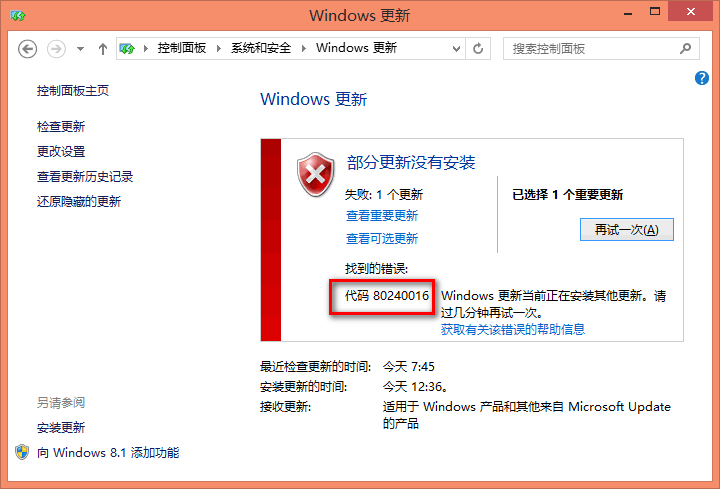
Win10 更新出現錯誤 0x80240016 (80240016)?重置 Wuauserv 服務與使用者權杖機制深度解析

編輯:Windows 10 系統介紹

Windows Update 報錯 0x80240016(十進位 80240016),意為「無法存取使用者權杖」。長時間不重開機導致權杖過期,或前後台更新服務衝突。官方標準修復:重啟 wuauserv 服務重新獲取權杖。

標準修復步驟(官方建議)

  1. 關閉所有「Windows Update」/「Microsoft Update」視窗。
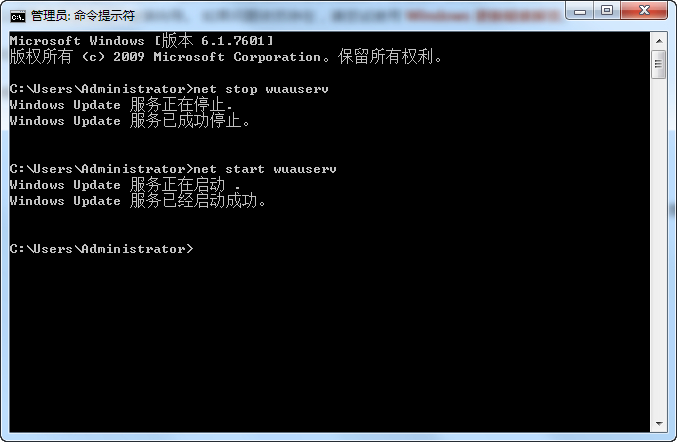
  2. 以管理員身分開啟「命令提示字元」。
  3. 依序執行:
    net stop wuauserv
    net start wuauserv
  4. 關閉 CMD,重新執行 Windows Update 檢查/安裝。

技術深度解析

  • 使用者權杖: 包含基本憑證,允許 Windows Update 以使用者身分對電腦進行變更,無需每次互動登入。
  • 過期機制: 系統長時間運行未重開機,權杖過期;或「自動更新」背景服務與前景手動更新同時運行,權杖衝突。
  • 重啟服務效果: 重置服務狀態,強制向安全性子系統 (LSA) 申請新權杖,恢復更新授權。

進階修復(標準法無效)

  1. 停用相關服務:
    net stop wuauserv
    net stop bits
    net stop cryptsvc
  2. 重命名快取資料夾:
    ren %systemroot%\SoftwareDistribution SoftwareDistribution.old
    ren %systemroot%\System32\catroot2 catroot2.old
  3. 重新啟動服務:
    net start wuauserv
    net start bits
    net start cryptsvc
  4. 重新執行 Windows Update。

適用錯誤代碼

  • WindowsUpdate_80240016
  • 0x80240016
此錯誤純屬服務層面權杖問題,非檔案損壞/磁碟錯誤。標準法「net stop/start wuauserv」有效率極高,建議首選。

Copyright © Windows教程網 All Rights Reserved