C:\Windows\TEMP 目錄所有內容FORFILES /P %WINDIR%\servicing\Packages /M Microsoft-Windows-InternetExplorer-*11.*.mum /c "cmd /c echo Uninstalling package @fname && start /w pkgmgr /up:@fname /norestart"
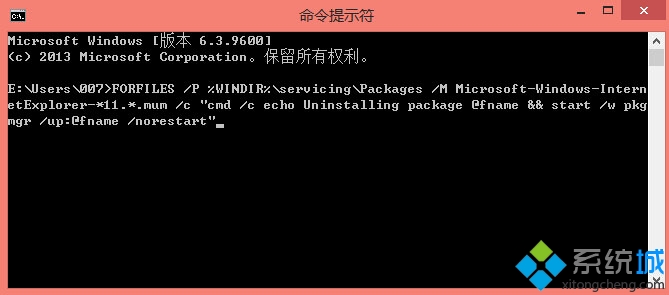
透過 pkgmgr 逐一移除 IE11 相關套件,清除殘留元件後再透過 Windows 功能重新安裝,可解決 IE11 損壞無法修復的問題。
Win10 更新驅動後裝置異常?裝置管理員「復原驅動程式」一鍵回滾
Win10 如何查看 IE 瀏覽器版本號?工具選單「關於 Internet Explorer」一鍵查詢
Win10 支援 iOS 應用嗎?Project Islandwood 橋接工具已開源,支援 Xcode 專案移植
Windows 10 移除 Windows 元件(開啟或關閉 Windows 功能)
Win10 9888 升級/安裝方式總覽:ISO 掛載/U盤/硬盤/VHD/軟媒工具多路徑可選
Windows 10 更換桌面壁紙的兩種方法(含顯示模式設定)