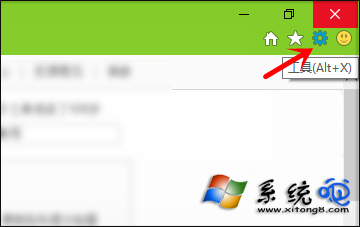
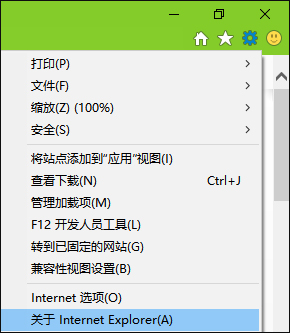
Win10 仍內建 IE11,查看版本號方法與舊版相同:開啟 IE → 點擊右上角齒輪圖示「工具」 (或 Alt + X) → 選擇「關於 Internet Explorer」 → 彈出視窗即顯示完整版本資訊。
此法通用於多數 Windows 應用程式 (工具/說明/關於),快速查詢軟體版本。
Win10 任務列通知區域圖示異常(空白、重複)?登錄表重置大法修復
Win10 技術預覽版無法執行騰訊遊戲?試試騰訊遊戲平台
Win10 開機彈出 rsdefense.exe 應用程式錯誤?登錄清理徹底根除殘留啟動項
Windows 10 如何移除內建應用程式?PowerShell 指令完整教學(含套件全名查詢技巧)
升級 Windows 10 後想重裝?完整流程與避坑指南
安裝 Windows 10 系統最低硬體需求完整說明
Win10 Edge 瀏覽器安裝擴充功能完整圖文步驟:下載、解壓、載入、啟用
Windows 10 擴充 C 槽系統分區空間教學 (Acronis Disk Director 11 Home)