PowerShell 快速檢視開始選單捷徑:
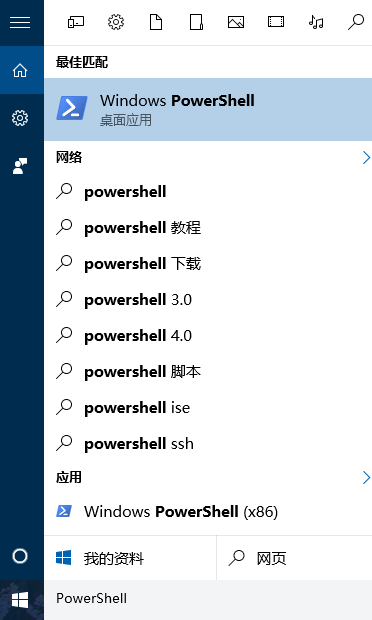
PowerShell
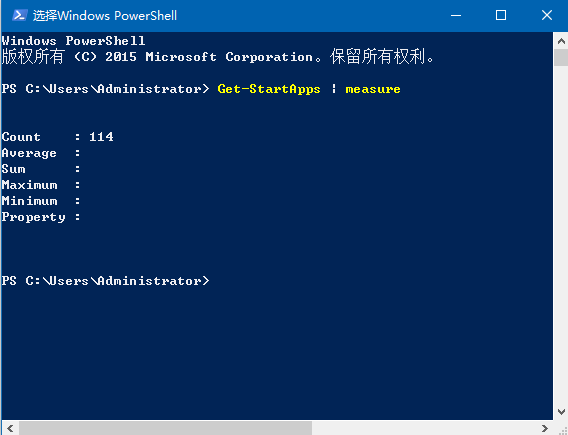
Get-StartApps | measure
Get-StartApps
無需第三方工具,原生指令即可完整掌握開始選單內容。
Win10 系統最低硬體需求:1GHz CPU、1/2GB 記憶體、16/20GB 硬碟、DirectX 9 顯卡
Win10 登錄備份與還原完整教學:完整備份、分支備份、雙重還原法
Windows 10 內建輸入法輸入頓號(、):反引號鍵 ` 而非斜線 /
Win10 變更預設印表機設定教學
Win10 9926 啟用 Cortana 語音喚醒「Hey Cortana」完整設定教學
Win10 系統音效檔案路徑與提取/自訂鈴聲教學
升級 Win10 預覽版 11099 後跳出 WSClient.dll 丟失怎麼辦?禁用排程任務一勞永逸
Windows 10 正式版美國 Newegg 提前開賣:數位版優惠價 99.99 美元起