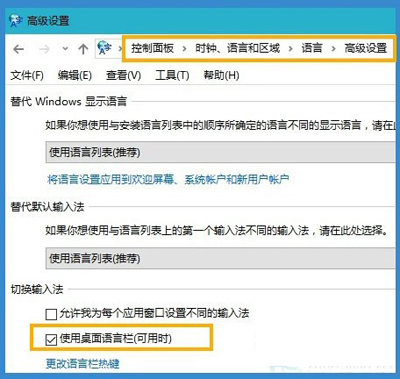
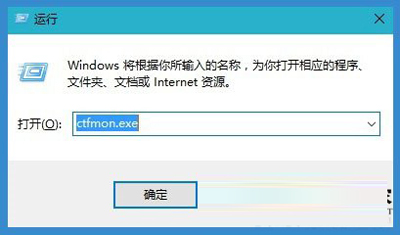
Windows 10 輸入法圖示變成單一鍵盤圖示、無法切換中文,解法與先前文章一致:
ctfmon.exe
根因通常為 ctfmon.exe 未隨開機啟動,建議將其加入啟動資料夾或登錄表 Run 鍵值實現永久自啟。
Run
Windows 10 任務列顯示程式圖示:設定 → 系統 → 通知與動作 → 選擇任務列顯示圖示
Win10 磁碟配額設定教學:限制使用者磁碟空間防止佔滿
Win10 CHKDSK 磁碟修復工具新增參數完整彙總
Win10 關閉 Cortana 小娜語音助手(需 10074 以上版本)
Win 10 開啟 Excel 2010 顯示中文亂碼?CSV 編碼轉 ANSI 格式解決
Win10 如何隱藏開始選單「最近常用應用程式」?個人化設定一鍵關閉保護隱私
Win10 照片應用隱藏 OneDrive 相片與影片來源
Win10 雙螢幕設定不同桌布?三步驟輕鬆實現多顯示器個性化