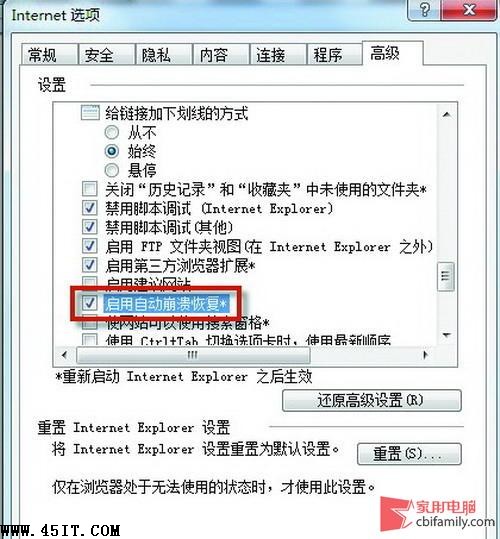
IE 崩潰後原本開啟的網頁全沒了,不像 Chrome/Firefox 有「還原分頁」功能。其實 IE8/9 內建同樣功能,只需開啟設定。
下次 IE 崩潰重開時,點選「工具」→「重新開啟上次瀏覽工作階段」,即可一鍵還原所有分頁。
360 瀏覽器首頁修改不了?雙重解鎖:瀏覽器設定 + 360 安全衛士主頁鎖定
IE 被惡意修改標題列、首頁、右鍵選單?註冊表修復大法還原乾淨瀏覽器
Outlook 2007 自動提醒功能導致自動關閉?Voxware Audio Codec 不相容,修改登錄檔排除
迅雷自訂掃毒副檔名,大幅縮短殺毒等待時間
迅雷「下載全部連結」一鍵抓取歌手全盤 MP3
IE8/IE9 崩潰怎麼辦?啟用「自動崩潰修復」找回上次開啟的分頁
FTP 回應代碼與常見錯誤訊息完整對照表:從 150 到 553、HTTP 錯誤、用戶端 Log 實例解析
六大設定徹底優化 IE 瀏覽器:臨時檔案、歷史記錄、自動完成、腳本、Cookie、內容分級