現象
下載的種子檔案無副檔名/亂碼,雙擊無法開啟,迅雷/比特彗星等下載工具無法識別。
解決步驟
- 補全副檔名:檔案重命名,手動加上
.torrent 後綴。
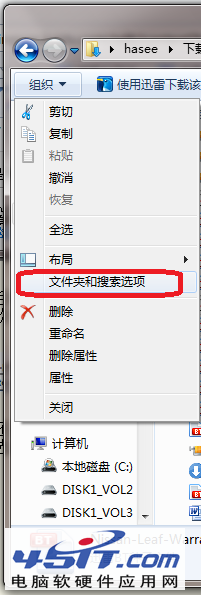
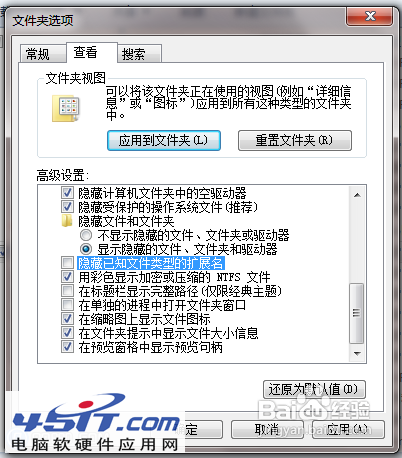
- 顯示副檔名(關鍵):
Win7/10/11:資料夾選項 →「檢視」→ 取消勾選「隱藏已知檔案類型的副檔名」→ 確定。
此後系統顯示真實副檔名,避免誤以為已加 .torrent 實際為 .torrent.txt。
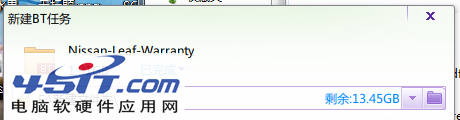
- 關聯下載工具:安裝迅雷/比特彗星/qBittorrent 等時,勾選「關聯 .torrent 檔案」。以後雙擊即可自動開啟下載。
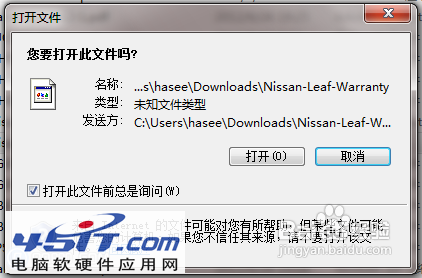

進階:查看種子內部資訊
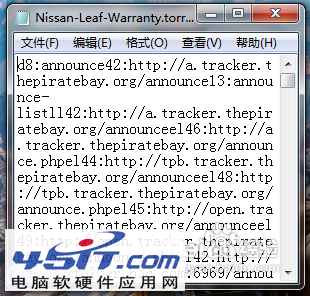
右鍵 .torrent 檔案 →「開啟方式」→ 選擇「記事本」/ 文本編輯器,可看到 Tracker URL、檔案列表、片段雜湊等原始資訊(BEncoding 格式)。
小技巧
- 下載種子連結時,瀏覽器若直接顯示亂碼,右鍵連結 →「連結另存為」→ 儲存為
.torrent 檔案。
- 磁力連結
magnet:?xt=urn:btih:... 可直接複製到下載工具,無需種子檔案。