Windows XP Windows 7 Windows 2003 Windows Vista Windows 綜合教學 Linux 系統教學
Windows 10 Windows 8 Windows 2008 Windows NT Windows Server 電腦軟體教學
您现在的位置: Windows教程網 >> Windows教程 >  >> 電腦軟體教學 >> 網路工具

Chrome Shockwave Flash 崩潰怎麼辦?停用內建 PPAPI 版 Flash 解決衝突

編輯:網路工具

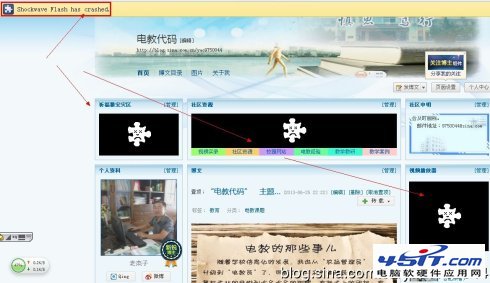
頁面 Flash 顯示人臉圖示、左上角提示「Shockwave Flash has crashed」,主因是 Chrome 內建 PPAPI 版 Flash 與系統安裝的 NPAPI 版 Flash 衝突。

解決步驟

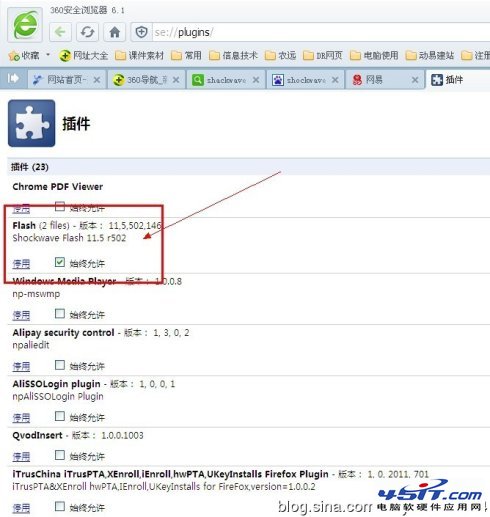
  1. 網址列輸入 about:plugins(或 chrome://plugins)開啟外掛清單。
  2. 找到 Adobe Flash Player (2 files) → 點「詳細資訊」展開。
  3. 兩組 Flash 路徑:
    • Chrome 內建:.../Google Chrome.app/.../PepperFlash/... (PPAPI)
    • 系統安裝:.../Library/Internet Plug-Ins/... (NPAPI)

  4. 建議停用 Chrome 內建 (PPAPI) 版,保留系統 NPAPI 版,避免 Chrome 更新導致新衝突。
  5. 重啟瀏覽器,Flash 正常載入,崩潰問題解決。


圖:Flash 崩潰顯示人臉圖示


圖:頁面左上角崩潰提示


圖:Plugins 清單顯示 2 files
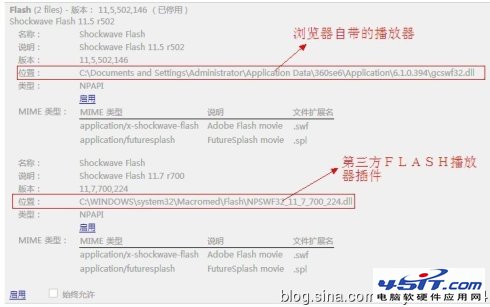

圖:停用第一個 (PPAPI) 後重啟

此法適用 Mac/Windows 所有 Chrome 核心瀏覽器,一勞永逸。

Copyright © Windows教程網 All Rights Reserved