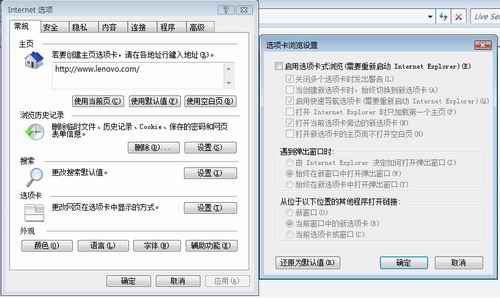
IE7 預設分頁模式不習慣?可改回傳統視窗模式。
適用 IE7.0 環境。
微信群人數上限到底是多少?官方與實測說法不一
當心 FlashGet 毀了你的硬碟:寬頻下必調寫入閾值,否則硬碟狂響壽命大減
2014 微信女生網名大全:可愛、唯美、深情風格 200+ 精選推薦
微信如何查看 QQ 好友?按分組查看、邀請未註冊好友
百度瀏覽器截圖功能怎麼用?內建塗鴉工具超方便
Internet 連線共享 (ICS) 啟動失敗「錯誤 1068」:相依服務未啟動完整排查與修復清單
深度挖掘:FlashGet 下載隱藏連結(JavaScript 動態連結)
百度雲離線下載圖文教學:BT/HTTP/FTP 任務建立與秒傳技巧