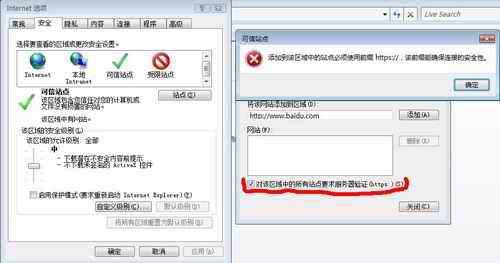
IE7 「安全性」→「信任的網站」→「網站」輸入 https://... 卻報錯「必須使用 https:// 格式」。
https://...
適用 IE7.0。
限制迅雷主動上傳:自訂模式設上傳為 0、關閉程式最徹底、綠色版/外掛完全禁用上傳
IE8 設定單視窗多標籤模式:避免新視窗佔滿工作列
IE8 完整移除教學:Windows XP / Vista / 7 / Server 2003 / 2008 官方標準與指令法
微信帳號保護機制完整教學:綁定手機、緊急凍結與解凍
MSN Shell 3.1 外掛:在 MSN 聊天視窗直接看電視/聽廣播
Google 進階玩法 5 選:監視鏡頭、新視窗開啟、關鍵字對戰、旅遊推薦與神秘關鍵字
迅雷下載佔滿頻寬導致網頁慢?啟用智能限速/自訂模式平衡體驗
IE 網頁背景全變白色、無法顯示原網頁背景色?取消「忽略網頁指定顏色」即可