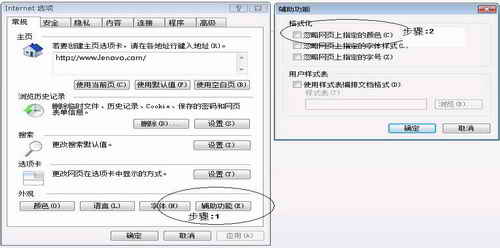
IE 瀏覽所有網頁背景皆為白色,原網頁設計的背景顏色、圖片完全不顯示。
IE 7.0 及以上版本。
MSN 相簿下載照片為縮圖無法還原?請對方上傳「原始尺寸」或改用郵件傳送
加快網頁顯示速度兩大絕招:禁用多媒體與調整快取
防範 IE 被惡意修改:註冊表修復與預防全攻略
BitTorrent (BT) 完整使用指南:原理、操作與下載技巧
新浪 UC 無法登入?三大常見原因與解決方案 (防火牆、代理、封鎖)
微信朋友圈圖片不顯示怎麼辦?四步排查從網路到重裝
Outlook Express 三大常見問題完整解決:壓縮提示、2GB 限制、dbx 損毀
如何設定瀏覽器首頁?IE、360、遨游瀏覽器圖文教學