Windows XP Windows 7 Windows 2003 Windows Vista Windows 綜合教學 Linux 系統教學
Windows 10 Windows 8 Windows 2008 Windows NT Windows Server 電腦軟體教學
您现在的位置: Windows教程網 >> Windows教程 >  >> 電腦軟體教學 >> 網路工具

IE 二級連結無法開啟?兩招一鍵修復:For 指令批次註冊、IE 內建 /rereg 參數

編輯:網路工具

傳統法需逐行輸入 8 條 regsvr32 指令,易忘且繁瑣。兩個新技巧只需一條指令:

1. For 指令批次註冊

CMD 執行:
For %i in (C:\windows\system32\*.dll) Do regsvr32.exe /s %i
(%i 區分大小寫,/s 關閉回顯,圖 1)。
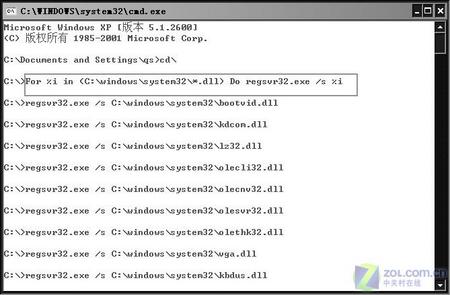

圖 1

2. IE 內建 /rereg 參數

「執行」輸入:
"%ProgramFiles%\Internet Explorer\iexplore.exe" /rereg
(圖 2),重開機即完成所有 IE 相關註冊表與 DLL 註冊。
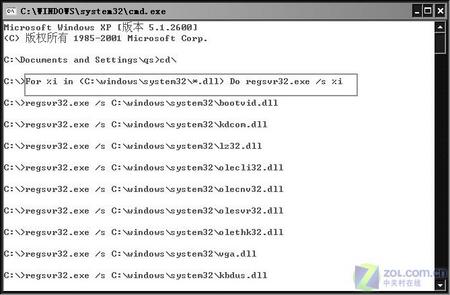

圖 2

兩法任選一,輕鬆解決二級連結無法開啟、網頁顯示不全、Java 失效等疑難雜症。

Copyright © Windows教程網 All Rights Reserved