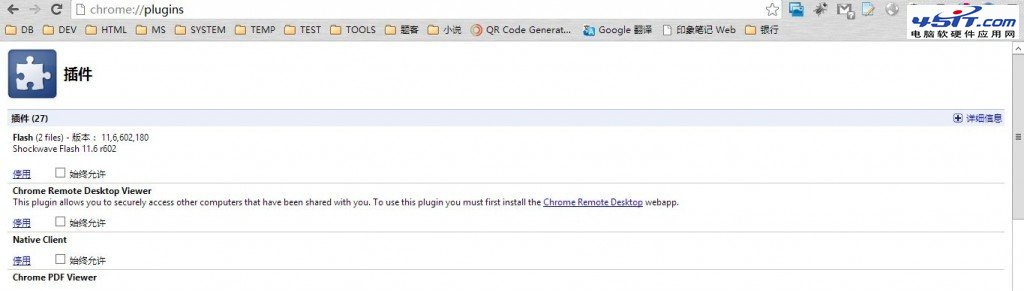
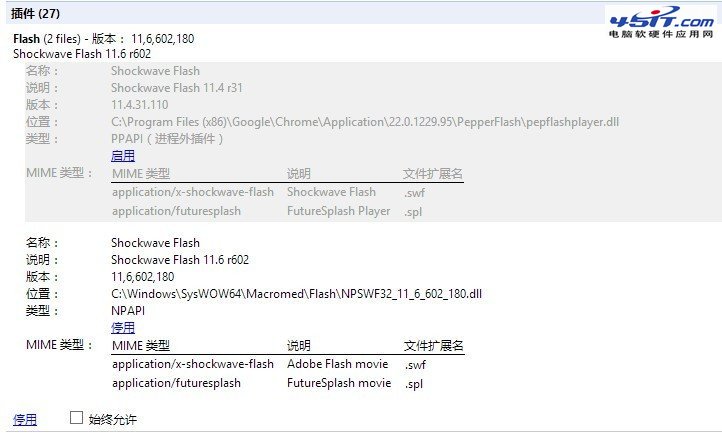
Chrome 瀏覽器開啟含 Flash 頁面時頻繁卡頓、彈出「外掛程式 Shockwave Flash 未回應」,主因是內建 PPAPI 版與系統 NPAPI 版衝突。
chrome://plugins
圖:Plugins 頁面總覽
圖:停用 PPAPI、啟用 NPAPI 設定結果
此法適用於所有 Chrome 核心瀏覽器(獵豹、360 極速等),一勞永逸解決 Flash 衝突。
飛信添加好友失敗?九大原因排查與官方申訴指引
Thunder Network 是什麼?能不能刪?刪不掉怎麼辦?完整解析
360極速瀏覽器完整快捷鍵大全:分頁/視窗、導航、功能、地址欄、網頁操作一覽表
如何將 Opera 瀏覽器設為預設瀏覽器?內建設定與系統關聯雙重保障
WiFi 共享精靈使用完整教學:筆記本一鍵變身無線熱點、支援 Ad-Hoc/WPA2、連線裝置管理
搜狗瀏覽器設為預設瀏覽器的快速方法
IE 出錯導致桌面消失?一招不重開機恢復 Explorer:Ctrl+Alt+Del → 新增任務 explorer.exe
微信鈴聲設定完整教學:同步手機系統鈴聲,輕松自訂新訊息提示音