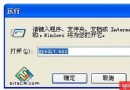
regedit
HKEY_LOCAL_MACHINE\SOFTWARE\Microsoft\Windows NT\CurrentVersion\Winlogon
DefaultUserName
DefaultPassword
AutoAdminLogon
1
密碼以明文存於登錄,任何能存取登錄編輯器者皆可讀取。請評估環境安全性後再啟用。
裝置管理員 3 大隱藏技巧:顯示詳細資訊、隱藏光碟機、顯示所有裝置
Windows XP 下使用虛擬光驅的兼容性指南與避坑技巧
Windows XP 內建 18 大實用工具:從磁碟清理到系統設定一覽表
HideFolder Now!:Windows 2000/XP 下最強資料夾隱藏工具,連 DOS 都看不見
徹底關閉 Windows XP 煩人的自動撥號彈窗
磁碟重組加速 5 步驟:空間預留、關閉螢幕保護、關閉程式、工具選擇、臨時檔遷移
為 Windows XP 共享資料夾設定密碼存取控制
解決 Windows XP 複製貼上出現亂碼問題