Windows XP 開機經過捲動條後進入藍畫面檢查磁碟,顯示 System Root \ Windows \system32 autochk.exe program not found skipping autocheck,隨後可正常進入系統。此問題常因使用 PQ、DiskKeeper 等磁碟工具操作不當,或登錄檔修改錯誤導致。
autochk.exe 找不到或略過自動檢查。regedit 開啟登錄編輯器。HKEY_LOCAL_MACHINE\SYSTEM\CurrentControlSet\Control\Session ManagerBootExecute。autocheck autochk *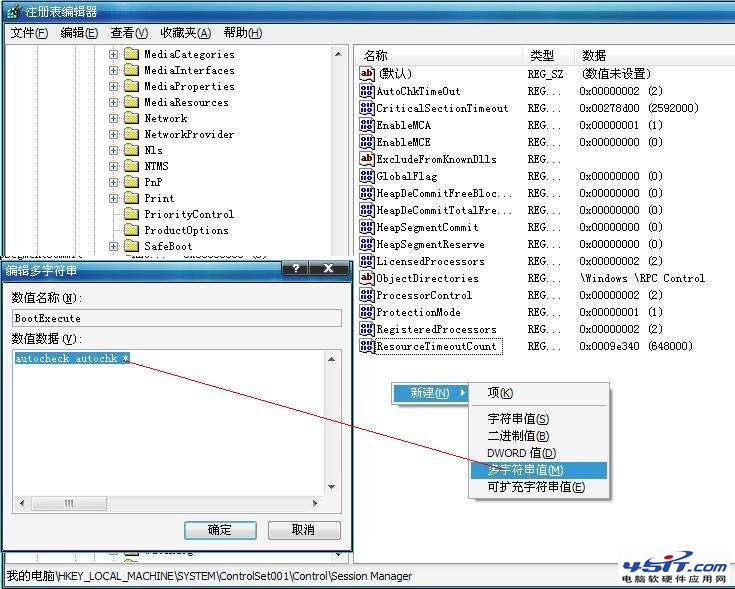
C:\Windows\System32\ 是否存在 autochk.exe。I386 目錄展開取得(expand autochk.ex_ C:\Windows\System32\autochk.exe),或從 C:\Windows\Repair\ 複製。優先嘗試 方法一(修復登錄檔),通常即可解決。若無效再依序嘗試方法二、三。操作前建議備份登錄檔或建立系統還原點。