不習慣工作列右下角通知區域圖示?XP 提供兩種原生方法快速隱藏,無需第三方軟體。
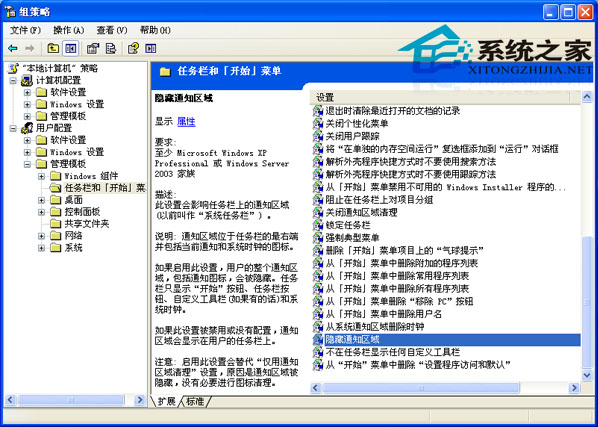
gpedit.msc
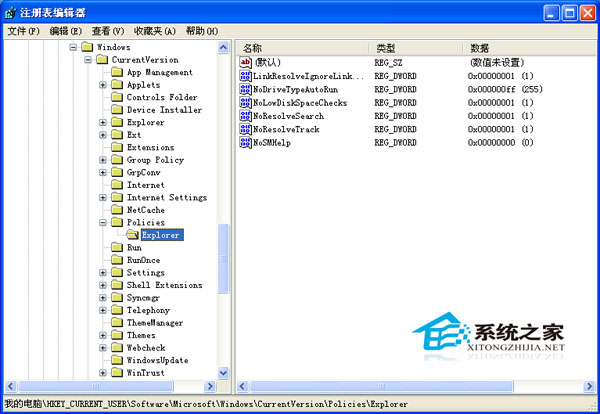
regedit
HKEY_CURRENT_USER\Software\Microsoft\Windows\CurrentVersion\Policies\Explorer
NoTrayItemsDisplay
1
0
若不想手動操作,360 安全衛士人工服務也能一鍵處理。
WinXP USB 隨身碟修復工具 PortFree Production Program 使用教學:低階格式化修復壞軌/容量異常
WinXP IE 提示「是否停止執行這個指令碼」?雙重修復方案
Windows 7 殺毒風波始末:微軟 Morro 傳聞、廠商反應、用戶真正需求
WinXP 我的電腦左側欄不見了怎麼找回?完整恢復教學
查看 Windows 95/98 版本號的方法
WinXP 系統如何設定路由器連接埠對應(虛擬伺服器)?以 TD-W89841N 為例
WinXP 純淨版安裝複製檔案階段報錯:四大硬體排查法
找回遺失的「顯示桌面」圖示:兩種快速恢復法