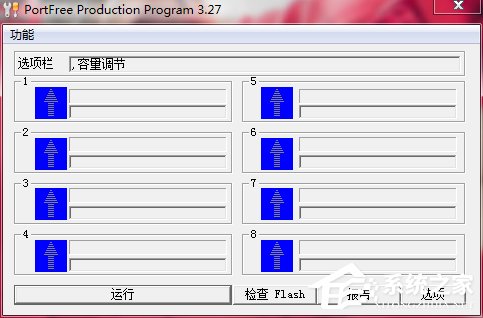
PortFree Production Program(星梭 USB 低階格式化工具)可修復 USB 隨身碟壞軌、容量顯示異常、無法格式化等問題。操作需謹慎,低格會清除所有資料。
使用步驟
- 開啟 PortFree Production Program,點擊右下角「選項」。
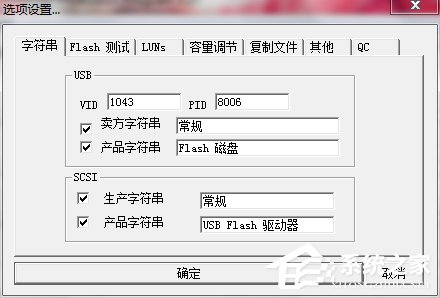
- 「其他」頁籤 → 「類型」選「可移動裝置」。
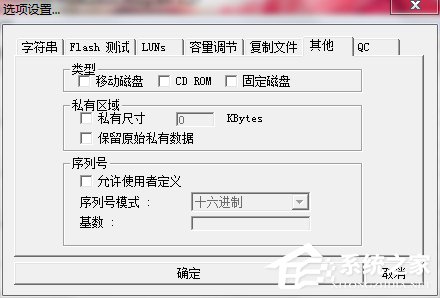
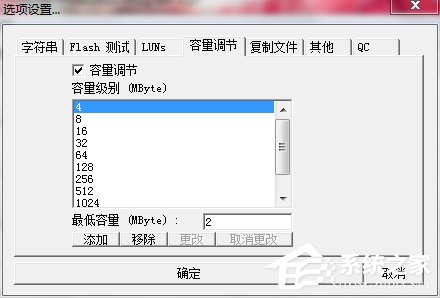
- 「容量校正」→ 選擇隨身碟實際容量(若無對應選項,點「新增」手動輸入)。
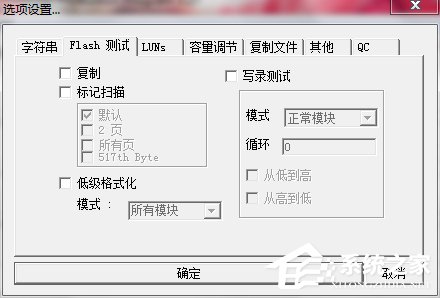
- 「Fast 測試」→ 選「低階格式化」。
參數:
- 「所有模組」:整顆低格(適用無壞軌)。
- 「正常模組」:僅低格良好區塊(適用有壞軌)。
- 點擊「OK」儲存設定,插入 USB 隨身碟,點擊「RUN」開始低階格式化。
進階:廠商資訊修復(若上述無效)
- 若記得隨身碟原廠
Vendor String(廠商名)與 Product String(產品名),在工具對應欄位填入(如 Newman USB Flash Disk)。
- 再次點擊「RUN」執行低格。
警告:低階格式化將永久清除隨身碟所有資料,操作前請確認已備份重要檔案。低格過程請勿拔出裝置或關機,以免造成實體損壞。