Windows XP Windows 7 Windows 2003 Windows Vista Windows 綜合教學 Linux 系統教學
Windows 10 Windows 8 Windows 2008 Windows NT Windows Server 電腦軟體教學

Windows Vista 修改登錄啟用「大型系統快取」 (LargeSystemCache) 提升記憶體利用率

編輯:Windows Vista 系統基礎知識

原理

啟用 LargeSystemCache 後,系統會將更多記憶體分配給檔案系統快取,減少磁碟 I/O,提升大量檔案存取效能,適合記憶體充足 (2GB 以上) 的工作站/伺服器角色。

操作步驟

  1. Win+R → regedit。
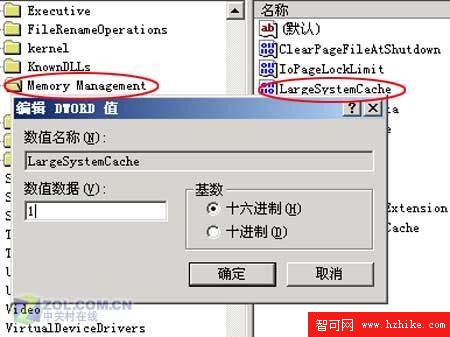
  2. 瀏覽至:
    HKEY_LOCAL_MACHINE\SYSTEM\CurrentControlSet\Control\Session Manager\Memory Management
  3. 找到 LargeSystemCache,雙擊將數值從 0 改為 1。
  4. 重新開機生效。

登錄 LargeSystemCache=1

後續調整

啟用後可依實際記憶體大小進一步微調快取參數,以達最佳效能平衡。

Copyright © Windows教程網 All Rights Reserved