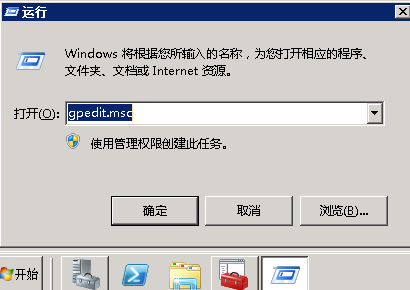
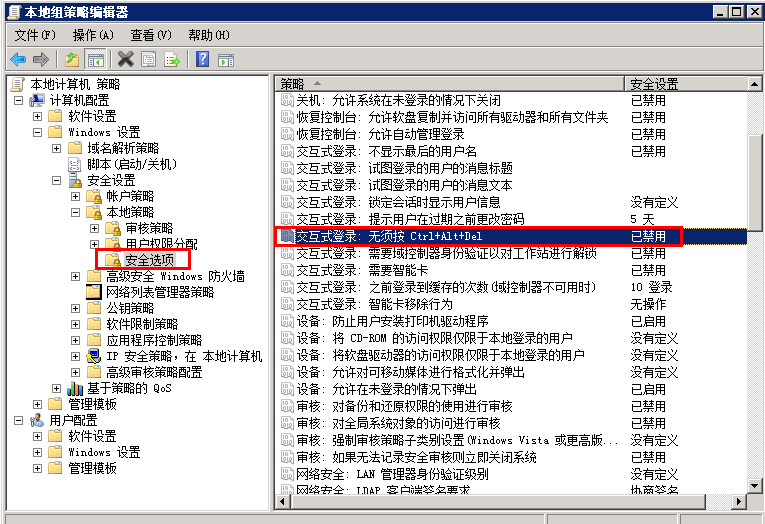
Windows Server 2008 R2 預設要求按 Ctrl+Alt+Del 才能進入登入畫面,透過群組原則可關閉此需求,加快登入流程。
gpedit.msc
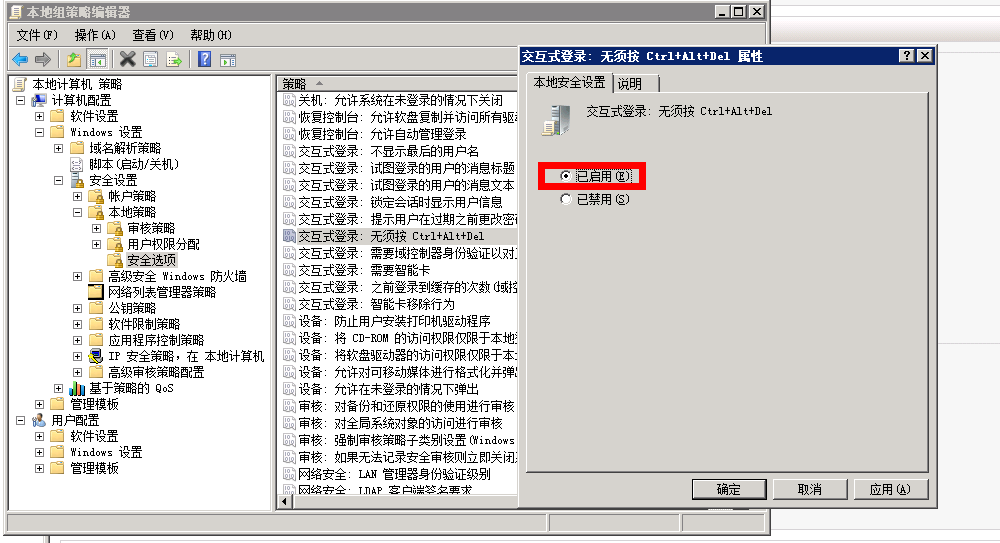
設定完成後即時生效,下次開機或切換使用者時將直接顯示登入畫面,無需按下三鍵組合。若需恢復,將該項目改為「已停用」或「未設定」即可。
Windows 主機 IIS 綁定多 IP 與多域名完整教學
Windows Server 2008 取消開機 Ctrl+Alt+Del 強制登入設定
DNS 伺服器 IP 設定完整教學:從原理到 Windows 圖形介面操作
Windows Server Core 加入網域與退出網域完整操作指南
Windows Server 2008 RAS + RADIUS (NPS) 整合部署實戰指南
解決 IIS 7.0 上傳超過 30MB 影片出現「找不到檔案或目錄」錯誤
Windows Server 2008 (WinSer 8) 無法存取共用資料夾官方排查步驟
Windows Server 2008 伺服器管理器:角色導向部署與統一管理