IIS 7.0 預設限制上傳檔案大小為 30MB (maxAllowedContentLength = 3000000 bytes),超過即回傳 404 錯誤。需修改 IIS_schema.xml 放寬限制。
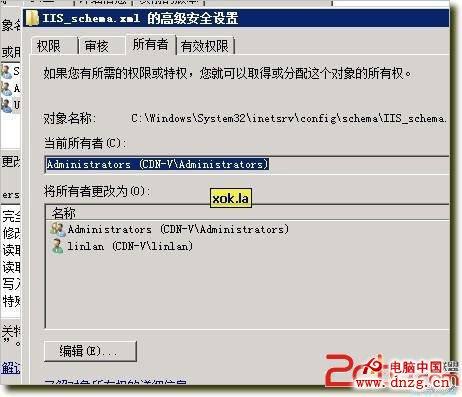
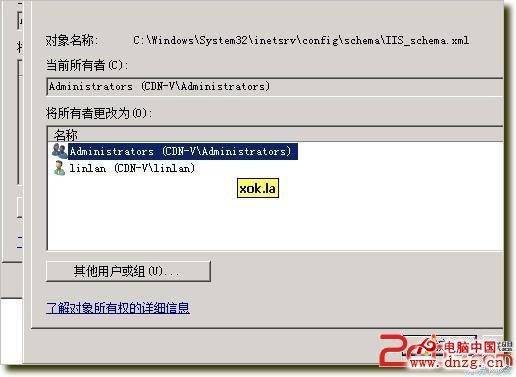
C:\Windows\System32\inetsrv\config\schema\IIS_schema.xml → 右鍵內容 → 安全性 → 進階 → 擁有者 → 變更為 Administrators → 給予 完全控制 → 取消「唯讀」屬性IIS_schema.xml,搜尋 3000000 (約第 1024 行)maxAllowedContentLength 屬性值,例如改為 300000000 (300MB):<attribute name="maxAllowedContentLength" type="uint" defaultValue="300000000" />iisreset 重啟 IIS 服務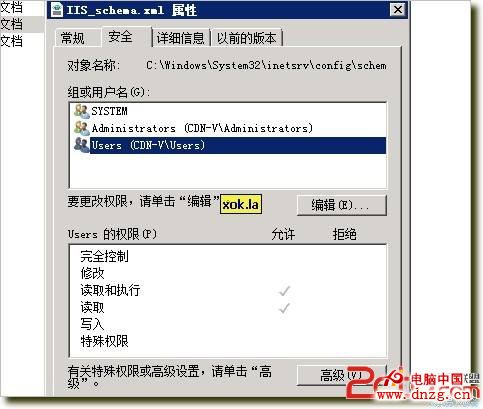
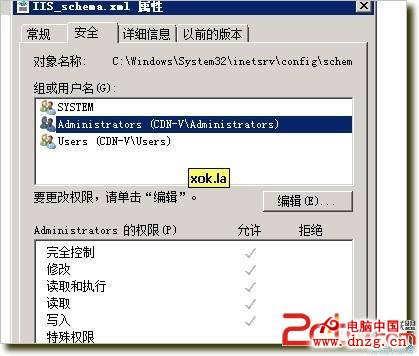
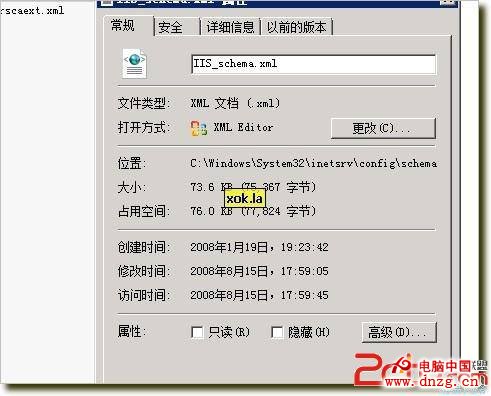
同樣適用於 IIS 7.5/8.0/8.5,修改後可支援大型媒體檔案上傳。
Windows Server 2008 R2 網路安全巧設定:網路位置分類、防火牆基礎與進階規則完整指南
Windows Server 2003 R2 IIS 架設 WebDAV 完整教學
掌握 Windows Server 2008 系統狀態變化的三大核心技巧
從 Windows Server 2003 就地升級到 2008 實戰紀錄:相容性檢查、多次重啟與軟體存活率
Windows Server 2012 棄用與移除功能完整指南
Windows Server 2008 常見問題解答 20 題完整指南
Windows Server 2012 叢集不支援與舊版混合執行
解決 U 盤安裝 Windows Server 2012 R2 報錯「Windows 無法開啟所需檔案」:install.wim 超過 4GB 限制