使用 USB 重灌 Linux 或多重開機系統後,重開機卡在 GRUB 畫面顯示 error 15: file not found,代表開機載入器找不到核心映像檔(vmlinuz)或 initrd。別慌,進入 GRUB 命令列手動指定路徑即可救援。
menu.lst / grub.cfg 設定錯誤(根分區 UUID/標籤不符)。(hd0,0) 對應錯誤。root (hd0,0) → Enter(確認系統分區,通常是第一顆硬碟第一個分區)。kernel (hd0,0)/boot/ → 按 Tab 自動列出可用核心檔(如 vmlinuz-2.6.9-42.ELsmp)。kernel (hd0,0)/boot/vmlinuz-2.6.9-42.ELsmp ro root=LABEL=/ vga=0x317 → Enterinitrd (hd0,0)/boot/initrd-2.6.9-42.ELsmp.img → Enterboot → Enter 開機。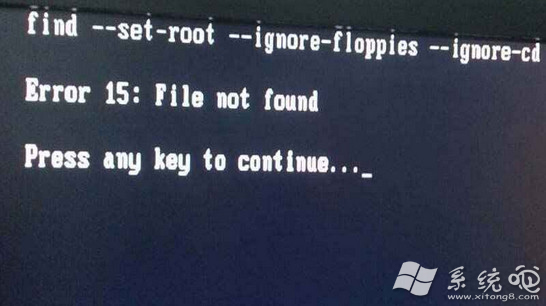
/boot/grub/menu.lst(或 /etc/default/grub + update-grub)。root、kernel、initrd 路徑正確,root= 參數建議用 UUID(blkid 查詢)。grub-install /dev/sda 重寫 MBR。set root=(hd0,1)
linux /boot/vmlinuz-xxx root=UUID=xxxx ro
initrd /boot/initrd-xxx.img
boot
原理相同,語法略異。建議平時備份 /boot/grub/grub.cfg,關鍵時刻可直接複製還原。