Windows XP Windows 7 Windows 2003 Windows Vista Windows 綜合教學 Linux 系統教學
Windows 10 Windows 8 Windows 2008 Windows NT Windows Server 電腦軟體教學

開機出現「Error 15: File not found」無法啟動?GRUB配置損壞需修復引導配置檔案

編輯:系統常見問題解答

重裝/多系統環境下開機出現 「Error 15: File not found」 (GRUB Legacy 常見錯誤),意指 GRUB 階段 1.5/2 無法在磁碟找到 stage2、menu.lst 或核心映像檔 (vmlinuz/initrd),導致引導鏈斷裂。需修復 GRUB 配置或重新安裝開機載入器。

錯誤成因分析

  • 分區調整/格式化導致 GRUB 所在分區編號/UUID 變更。
  • menu.lst (GRUB Legacy) 或 grub.cfg (GRUB2) 內核/ initrd 路徑錯誤。
  • 安裝新系統覆寫 MBR 但未正確配置 GRUB 指向舊系統分區。
  • 磁碟壞軌/檔案系統損壞導致關鍵引導檔案遺失。

修復方案

方案一:使用 Bootice / EasyBCD / GRUB4DOS 工具箱修復 (Windows 環境下,圖形化簡單)

  1. 進入 Windows (另一系統) 或 WinPE。
  2. 運行 Bootice →「磁碟映像」→ 選擇目標磁碟 →「備份/還原 MBR」/「修復 GRUB」。
  3. 或使用 EasyBCD →「BCD 備份/修復」→「重新建立 BCD」/「新增 Linux/GRUB 項目」。

方案二:Linux LiveCD/USB 進入 chroot 環境重裝 GRUB (最標準、徹底)

  1. 啟動 Ubuntu/Fedora/Arch 等 Live 系統。
  2. 掛載系統分區:
    sudo mount /dev/sdXn /mnt (sdXn 為根分區,如 sda2)
    sudo mount /dev/sdXm /mnt/boot (若有獨立 /boot 分區)
    sudo mount --bind /dev /mnt/dev && sudo mount --bind /proc /mnt/proc && sudo mount --bind /sys /mnt/sys
  3. sudo chroot /mnt 進入系統環境。
  4. 重裝 GRUB:
    GRUB2 (現代多數發佈版):
    grub-install /dev/sdX (sdX 為磁碟非分區,如 sda)
    update-grub (或 grub-mkconfig -o /boot/grub/grub.cfg)
    GRUB Legacy (極舊系統):
    grub → root (hd0,1) → setup (hd0) → quit
  5. exit 退出 chroot,umount -R /mnt 卸載,重啟驗證。

方案三:Windows 多系統環境用 EasyBCD 新增 Linux 啟動項

Win7/10/11 為主系統時,EasyBCD →「新增條目」→「Linux/BSD」→ 類型選「GRUB2」/「GRUB Legacy」→ 名稱自訂 → 選擇 Linux 根分區 → 「新增條目」,讓 Windows Boot Manager 傳遞控制權給 GRUB。
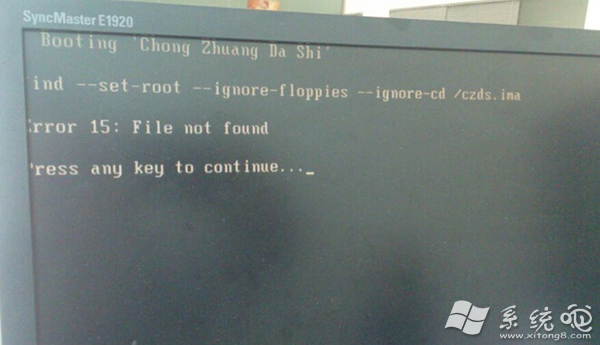
Error 15 File not found錯誤畫面

參考資源: 詳細圖文教程請搜尋 「Bootice 修復 GRUB 引導教程」、「Linux LiveCD chroot 重裝 GRUB 步驟」。

Copyright © Windows教程網 All Rights Reserved