Windows XP Windows 7 Windows 2003 Windows Vista Windows 綜合教學 Linux 系統教學
Windows 10 Windows 8 Windows 2008 Windows NT Windows Server 電腦軟體教學
您现在的位置: Windows教程網 >> Windows教程 >  >> Windows 綜合教學 >> 關於 Windows

Win7 藍屏 win32k.sys 修復實戰:從病毒清除到系統還原

編輯:關於 Windows

遭遇 win32k.sys 藍屏?實測修復全紀錄,供同樣遇到問題的朋友參考。
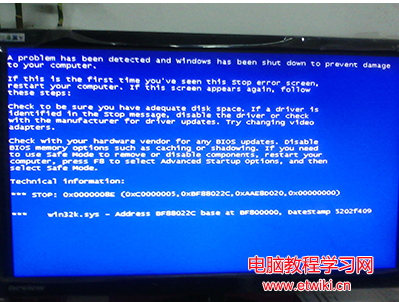
藍屏畫面

修復流程

  1. 進入 WinPE 掃毒,排除病毒感染可能。
  2. 定位系統檔:C:\Windows\System32\win32k.sys 與 C:\Windows\System32\dllcache\win32k.sys 兩份備份。先將兩者改名備份,重開機仍藍屏但提示「未知硬體錯誤」。
  3. 以 dllcache 版本覆蓋 System32 版本,重開機藍屏消失,系統可進入。
  4. 安全模式清理殘留:用 System Repair Engineer 發現異常 Explorer.exe 與隱藏啟動項,刪除後隱藏項自動重現;繼續清理可疑服務/驅動。
  5. wsyscheck 深度掃描:發現雙 Explorer.exe 進程且大量執行緒注入關鍵進程。啟用「禁止執行緒重生」,刪除惡意 DLL 本體並卸載模組,最終連同兩個異常 Explorer.exe 一併移除。
  6. 後果與補救:重開機發現 explorer.exe 遺失(被誤刪),桌面空白。任務管理器 → 新增工作 → 瀏覽定位 C:\Windows\explorer.exe 手動啟動,再修復防毒軟體並全盤掃毒,系統恢復正常。
教訓:手動清理惡意模組風險極高,誤刪系統關鍵檔導致更嚴重故障。建議優先使用可信防毒軟體深度掃描、修復系統檔(sfc /scannow、DISM),實在無解再尋求專業協助。

Copyright © Windows教程網 All Rights Reserved