Windows XP Windows 7 Windows 2003 Windows Vista Windows 綜合教學 Linux 系統教學
Windows 10 Windows 8 Windows 2008 Windows NT Windows Server 電腦軟體教學
您现在的位置: Windows教程網 >> Windows教程 >  >> Windows 綜合教學 >> 關於 Windows

Win8.1 桌面假死無回應?重啟 Windows 探索器進程 10 秒搞定

編輯:關於 Windows

Win8.1 桌面點擊無反應、工作列程式無法切換,主因 explorer.exe (Windows 探索器) 停止回應。任務管理員重啟進程即可恢復:

快速修復流程

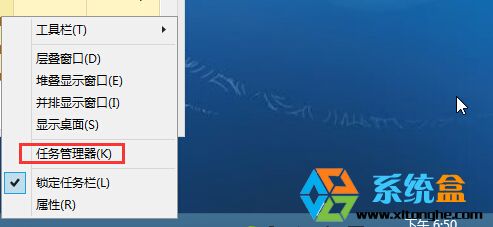
  1. 右鍵工作列 → 「工作管理員」 (或 Ctrl+Alt+Del 呼叫)。
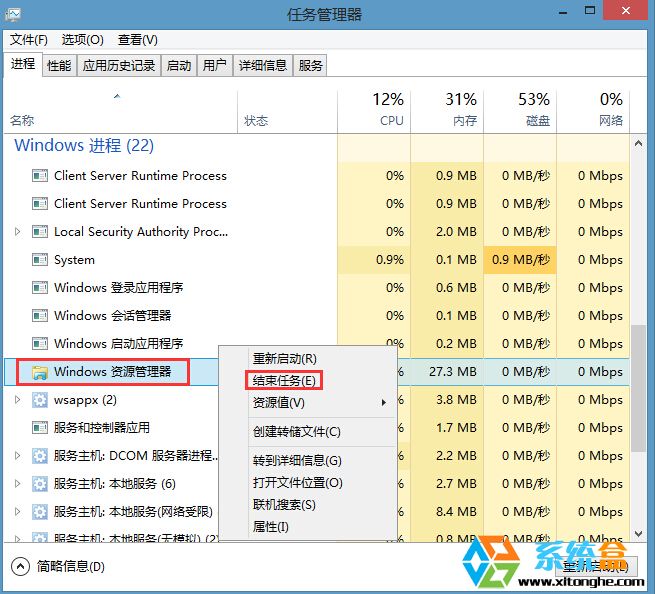
  2. 點選「詳細資料」 → 「進程」分頁找到 Windows 探索器。
  3. 右鍵 → 「結束工作」。
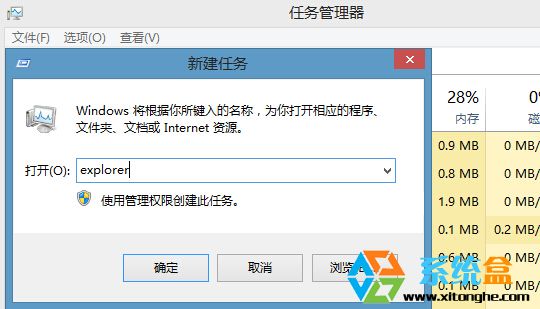
  4. 工作列消失、桌面變黑後,工作管理員「檔案」→ 「執行新工作」 → 輸入 explorer.exe → 確定。
  5. 桌面、工作列、開始畫面全數恢復正常操作。

此法避免強制重啟導致未存檔資料遺失,適用於探索器無回應造成的桌面假死。

Copyright © Windows教程網 All Rights Reserved