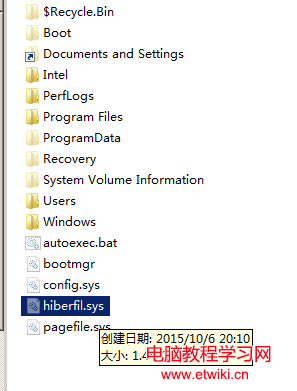
C 槽根目錄常見巨型檔 hiberfil.sys(數 GB),是 Windows 休眠功能保留的記憶體映像檔。關閉休眠即自動刪除該檔案,不佔空間又乾淨。
hiberfil.sys
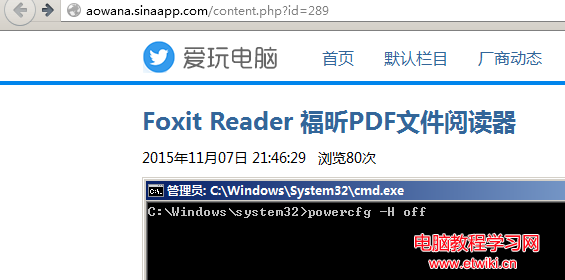
powercfg -H off
執行瞬間 hiberfil.sys 消失,C 槽立即騰出空間。若未來需要休眠,執行 powercfg -H on 即可恢復。
powercfg -H on
補充:快速啟動也依賴休眠檔,關閉後開機速度略有影響(SSD 差異極小),視個人需求取捨。
Windows 8 關機方法大全:四種快速關機/重啟技巧
Win10 Mobile 10149 上手體驗:海量截圖與視頻,Edge 正式啟用、磚塊模糊修復
Win7 連不上網提示「預設閘道不可用」?啟用 FIPS 相容性修復
Win10 硬碟佔用 100% 導致卡頓?停用 HomeGroup Listener 與 IPv6 服務緩解
Win10 Build 9888 進入消費者預覽版階段:1 月底媒體發布會揭曉
Windows 7 取得最高權限 TrustedInstaller:刪除系統檔案不再受阻
Windows 10 首版 Build 10240.17071 累積更新:修復 IE11、BitLocker、夏令時間等錯誤
Win8 設定滑鼠左手模式(左撇子專用)完整圖文教學