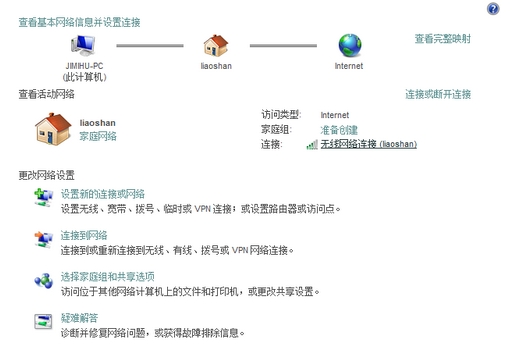
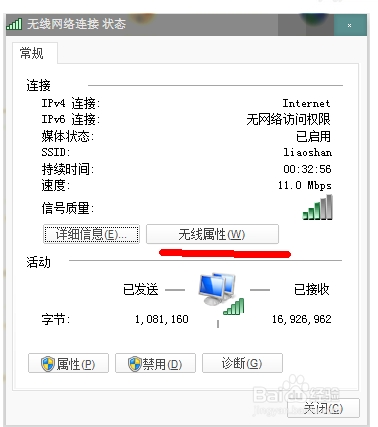
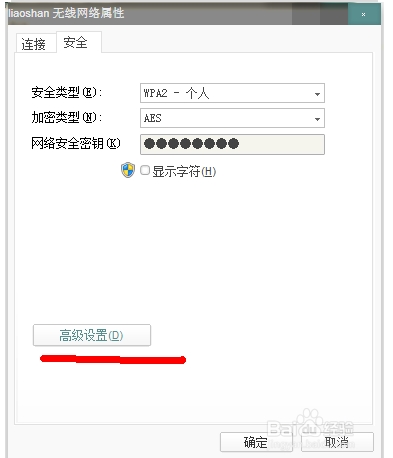
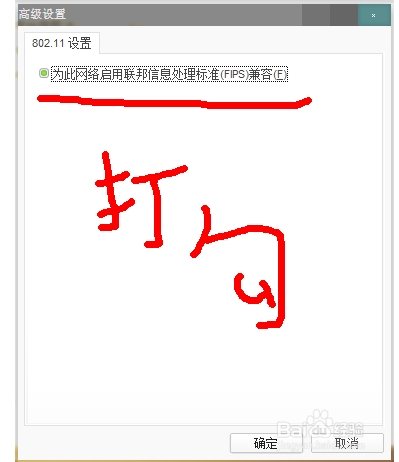
路由器、網線正常但 Win7 提示「預設閘道不可用」,嘗試在無線網路介面卡進階設定啟用 FIPS 相容性:
此法針對特定加密協定相容性問題,若無效請檢查驅動程式、IP 設定或路由器加密模式。
Win7 睡眠/離開模式不關閉網卡持續下載:迅雷設定與手動裝置管理員兩法
Win8 照片應用不顯示新照片?必須先開啟應用再匯入圖片才會同步顯示
Windows 10 開始選單變化一覽:經典功能再升級
免費升級 Win10 資格取得與硬體需求完整指南:360 一鍵檢測教學
Win10 Mobile 10549 新功能上手體驗影片:DPI 縮放、多膚色 Emoji、訊息多行編輯
Win10 正式版預設瀏覽器無法在瀏覽器內修改?必須在系統設定→預設應用程式→Web 瀏覽器變更
Win10 開始選單消失或無法開啟?一招快速修復
[影片] Win10 手機 10549 體驗:Bug 影響日常使用,不建議主力機更新