惡意軟體、工具列常透過群組原則或登錄鎖定 IE 首頁,導致使用者無法透過「網際網路選項」變更。直接修改登錄機碼可立即恢復控制權。本文說明定位與修改關鍵機碼。
regedit → Enter。HKEY_CURRENT_USER\Software\Policies\Microsoft\Internet Explorer\MainStart Page 字串值 → 雙擊修改為想要的首頁網址 (如 https://www.google.com、about:blank) → 確定。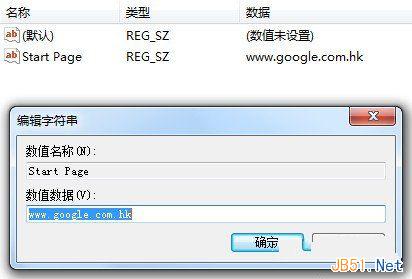
HKEY_LOCAL_MACHINE\Software\Policies\Microsoft\Internet Explorer\Main\Start Page (機器層級,需管理員權限)HKEY_CURRENT_USER\Software\Microsoft\Internet Explorer\Main\Start Page (使用者偏好設定,通常未被鎖定)HKEY_CURRENT_USER\Software\Microsoft\Internet Explorer\Main\Default_Page_URLgpedit.msc →「使用者設定」→「系統管理範本」→「Windows 元件」→「Internet Explorer」→ 確認無「停用變更首頁」等強制原則。Internet Explorer 已於 2022/06/15 結束支援 (IE11 桌面應用程式),Edge 以 IE 模式相容舊版企業應用。個人用戶請遷移至 Microsoft Edge (Chromium)、Chrome、Firefox 等現代瀏覽器,享受安全更新與標準支援。