Windows XP Windows 7 Windows 2003 Windows Vista Windows 綜合教學 Linux 系統教學
Windows 10 Windows 8 Windows 2008 Windows NT Windows Server 電腦軟體教學
您现在的位置: Windows教程網 >> Windows教程 >  >> Windows 綜合教學 >> 關於 Windows

Windows 9 新功能 Storage Sense 與 Wi-Fi Sense:源自 Windows Phone 的跨裝置儲存與無線管理體驗

編輯:關於 Windows

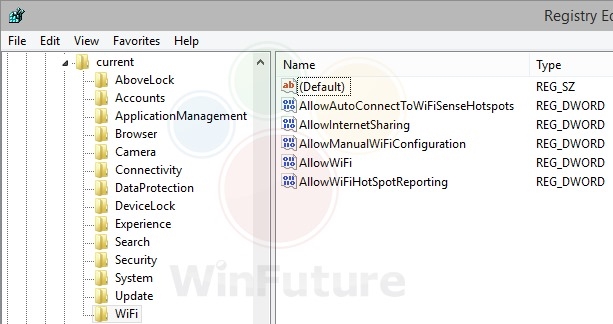
Windows 9 (Threshold) 洩露截圖揭示兩項源自 Windows Phone 8.1 的 Sense 功能移植至桌面:Storage Sense (儲存感知) 與 Wi-Fi Sense (Wi-Fi 感知),標誌著跨裝置體驗整合的關鍵步驟。本文根據截圖解析功能細節與演進脈絡。
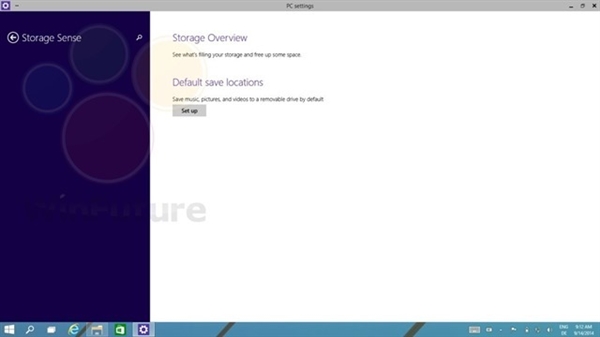
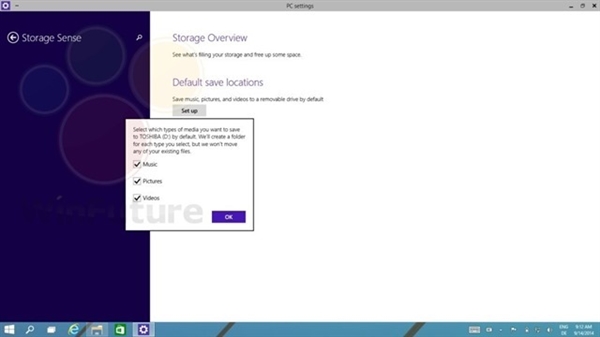
Storage Sense (儲存感知)

  • 功能:視覺化儲存用量分類 (應用、遊戲、影片、文件、系統、暫存檔)、設定預設儲存位置 (文件、圖片、影片、音樂、離線地圖 → SD 卡/USB/第二顆硬碟)、臨時檔案清理。
  • 介面:現代化設定頁面,尚在開發中 (截圖顯示簡單版本),預計取代 Win8.1「磁碟空間」Metro 應用。
  • 對比桌面版磁碟管理:桌面版「磁碟管理」 (diskmgmt.msc) 功能最完整 (分割、掛載、RAID、BitLocker),Storage Sense 定位為消費者級簡易管理。

Wi-Fi Sense (Wi-Fi 感知)

  • 來源:Windows Phone 8.1 功能。
  • 核心能力:
    - 自動接受開放熱點條款連線 (機場、咖啡廳、飯店)。
    - 將已連線 Wi-Fi 認證安全分享給 Outlook.com 聯絡人、Skype 好友、Facebook 朋友 (僅分享加密憑證,不透露明文密碼)。
    - 好友在信任範圍內自動連線無需輸入密碼。
  • 隱私爭議:分享機制引發安全性討論,Windows 10 正式版改為需手動勾選「與聯絡人分享網路」、企業版預設停用。

Sense 家族演進

Sense 功能Windows PhoneWindows 10 桌面現狀
Storage Sense8.1 引入1507 移植 → 1703 自動清理開關 → 11 整合清理建議持續演進
Wi-Fi Sense8.1 引入1507 移植 → 1607 企業版停用 → 1809 消費者版預設關閉分享功能保留但預設關閉
Data Sense (流量感知)8.1 引入未直接移植,功能整合至「網路與網際網路 → 資料使用量」整合重組
Battery Sense (省電模式)8.1 引入整合至「電池節省模式」/「電源與睡眠」整合重組

Windows RT/Phone 合併背景

Microsoft 2014 宣布 Windows RT (ARM 平板) 與 Windows Phone 合併為單一行動作業系統 (後為 Windows 10 Mobile),Sense 功能移植至桌面版是統一跨裝置體驗的先鋒嘗試。雖然 Windows 10 Mobile 最終失敗,但 Storage Sense 成為 Windows 10/11 核心功能長存至今。

Copyright © Windows教程網 All Rights Reserved