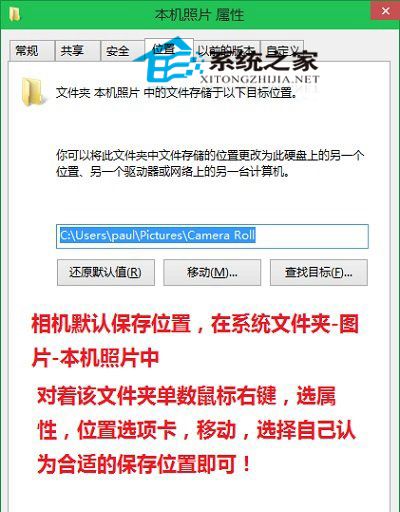
Win10 Metro 風格相機應用拍攝照片預設儲存於 C:\Users\使用者名稱\Pictures\Camera Roll (本機相片)。可透過資料夾屬性「位置」索引標籤移動:
C:\Users\使用者名稱\Pictures\Camera Roll
Pictures\Camera Roll
此設定對平板/二合一筆電用戶尤為實用,可將照片直接存至大容量資料盤避免 C 槽爆滿。
硬碟容量「縮水」之謎:Win7/Win8 缺失磁碟空間去哪了?
Win10 Mobile 週年更新慢速/發布預覽版 14393.187 今日推送:主要修復 Bug 與穩定性提升
製作 USB 開機碟提示「開機磁區未知」的三大原因與解決辦法
Win7 跳出「儲存空間不足,無法處理此命令」?原因分析與三大解決方案
徹底關閉 Windows 預設共享(C$, ADMIN$, IPC$)四大法:停用服務、註冊表、批次檔、網卡解綁
Win10 內建應用更新終於有更新日誌了!郵件與行事曆率先支援「新功能內容」查看
Win10 設定圖片密碼登入:比傳統密碼更安全更個性化
Win10 小娜語音無法開啟 IE?建立「IE」捷徑讓 Cortana 聽懂縮寫指令