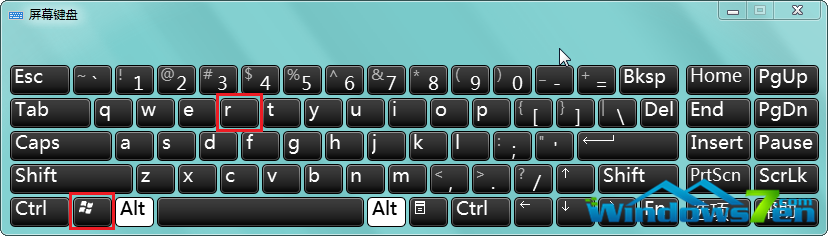
右鍵「新建」或桌面空白處右鍵延遲數秒彈出,主因是安裝軟體過多在 ContextMenuHandlers 註冊大量擴充功能。刪除非必要項目即可大幅加速。
ContextMenuHandlers
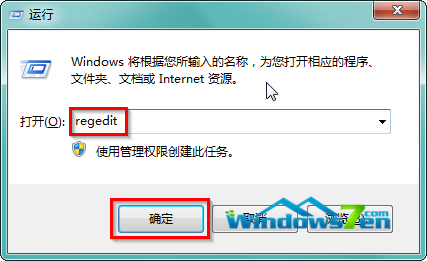
regedit
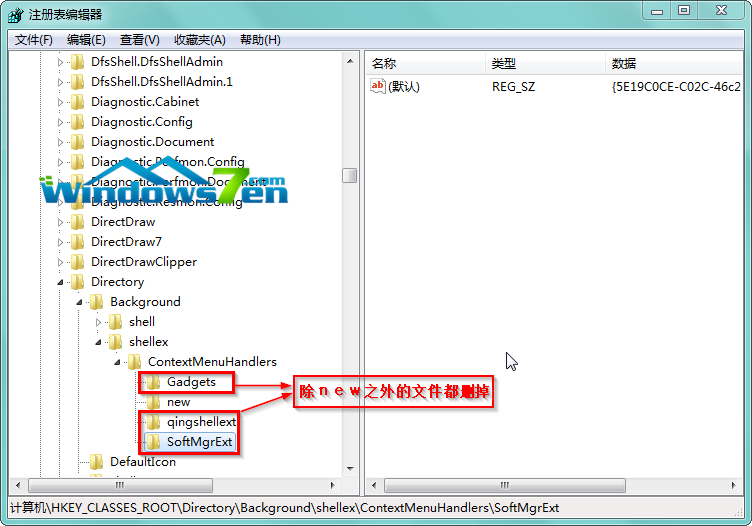
HKEY_CLASSES_ROOT\Directory\Background\shellex\ContextMenuHandlers
new
熟悉登錄者可進一步刪除「新建」選單內不需的項目,或使用 ShellExView / CCleaner 圖形化管理右鍵擴充功能,更安全直觀。
Windows 行動中心無法開啟?群組原則啟用 Win+X 熱鍵與行動中心完整修復
Windows 7 安裝流程完整圖解:從開機引導到桌面進入
Win10 激活問題全攻略:四步搞定數字授權、產品密鑰、清潔安裝、電話激活
Windows 10 升級預約怎麼取消?徹底移除升級圖示三步驟
Win7 磁碟清理完整指南:釋放 C 槽空間、清除系統還原點、移除舊版更新
Windows 7 善用 slmgr 指令保護產品金鑰:從登錄移除防止惡意提取
修復 Win7 右鍵管理導致 explorer.exe 崩潰:修正登錄機碼 Manage 指令參數
Windows 7 聲音卡驅動安裝失敗完整修復:驅動人生配合手動替換檔案