Win7 右鍵「電腦」選「管理」導致桌面總管崩潰,主因是登錄機碼 Manage 指令參數錯誤。修正後即可恢復正常。
regedit),建議先備份登錄。HKEY_LOCAL_MACHINE\Software\Classes\CLSID\{20D04EF-3AEA-1069-A2D8-08002B30309D}\Shell\Manage\Command%Windir%\SYstem32\MMC.exe /s %Windir%\System32\Compmgmt.mscCompMgmt.reg 備份,重開機或重新登入生效。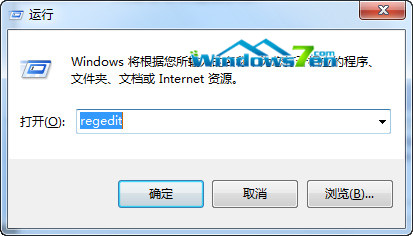
圖 1 開啟登錄編輯器
問題非系統故障,單純登錄參數錯誤,修正後即可正常使用「計算機管理」。
升級 Win10 後第三方瀏覽器無法開啟網頁怎麼辦?兩招重置網路協定完美解決
Windows 7 安裝 Telnet 用戶端與伺服器功能,實現遠端連線管理
Win10 C 槽空間莫名縮水?FileRepository 驅動快取膨脹為主因,兩招釋放空間
Win10 瀏覽器續航大比拼:IE 與 Edge 勝出,較 Chrome 多撐 30-59 分鐘
NSIS 打包安裝程式在 Win7 無法建立桌面捷徑?加入 RequestExecutionLevel admin 解決權限問題
Windows 10 桌面顯示「未啟用」浮水印無法遮蓋?輸入金鑰或購買授權即可移除