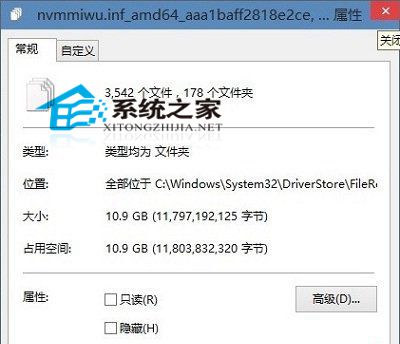
Win10 安裝未滿半月,C 槽空間卻少了數 GB。主因為 C:\Windows\System32\DriverStore\FileRepository 資料夾膨脹:Windows Update 持續下載驅動程式更新,即使安裝失敗仍保留檔案,終佔滿磁碟。
C:\Windows\System32\DriverStore\FileRepository
FileRepository
定期清理此資料夾可有效避免 C 槽空間持續流失。
安裝 Win7 提示「無法更新開機配置」故障原因與解決:修復 MBR、重新分區
Windows 10 正式版如何利用頻寬向其他用戶分發更新?WUDO 功能詳解與關閉方法
Win10 如何關閉 IPv6?網路介面卡屬性一鍵停用,解決網卡假死、未回應問題
Win10 Insider 14986升級15002實戰記錄:多次重啟、應用重裝、新增Apps設置分類
瀏覽器提示「此網頁包含重新導向循環」崩潰?360 安全衛士一鍵修復教學
微軟官方確認:Windows 10 PC/平板版 7 月 29 日推送免費升級,手機版稍晚推出
Windows 10 開始選單顯示資料夾自訂:小娜直達法與設定法雙教學
Win7 便箋使用教學:建立、編輯、顏色分類、快速鍵、桌面置頂