許多用戶已加入 Win10 盛宴,Win7/8.x 用戶可免費升級。除隱私問題外,值得注意:預設情況下 Win10 會透過你的網路連線與網際網路其他裝置分享更新。此功能稱「Windows Update Delivery Optimization」(WUDO),Win10 家庭版與專業版預設啟用以獲更快更新;企業版與教育版同具備但僅用於區域網路。
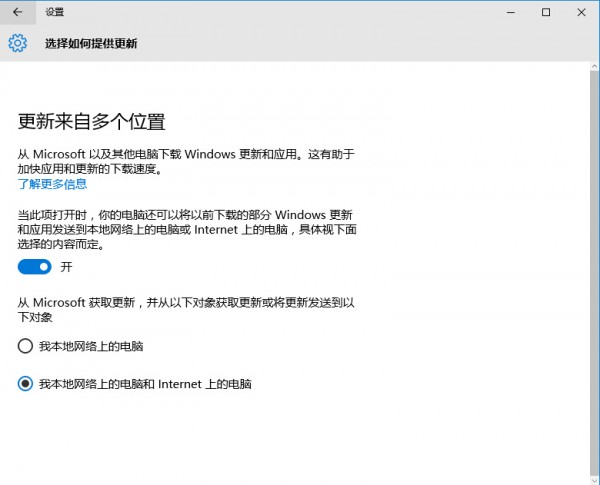
此功能基本即常見種子網路:將你的電腦作為系統更新傳播節點,透過 P2P 將更新更快傳給其他用戶,想法不錯,除非你的網路受限。
可關閉 WUDO,但設定選項稍模糊:設定選單 → Windows Update → 進階選項 →「選擇如何提供更新」進行選擇。
微軟說明分發選項不會下載或分發個人資料,僅發送更新「部分」快取,但對原本頻寬不快用戶顯然不公平。
Win10 Build 10135 32 位元英文 ISO 鏡像下載(CRC/MD5/SHA1 驗證碼)
Windows 10 最低系統需求:1GHz/1GB/16GB 即可運行,舊電腦優化技巧
Win10 預覽版開機慢?四招優化啟動速度讓你告別 30 秒等待
聯想筆電提取出廠原版 Windows 8 系統映像:BOOTICE 掛載隱藏分區備份 Install.wim
被放棄的 Windows 9 截圖曝光:版本號顯示「Windows 9 專業版」,實為 Windows 7 SP2 偽裝
Win10 如何為 Microsoft 拼音輸入法設定自訂詞組?修改系統詞庫檔案 ChsPinyinUDP.lex 實現