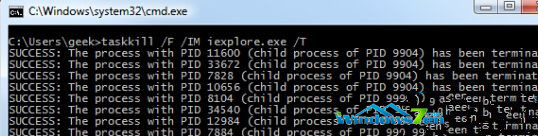
任務管理器中出現大量同名重複進程(如 iexplore.exe)會佔用資源、拖慢系統。逐個結束太麻煩,可用 taskkill 一鍵批量終止:
iexplore.exe
taskkill
cmd
taskkill /F /IM iexplore.exe
/F
/IM
開啟 CMD
執行 taskkill 指令
同理可替換其他進程名稱(如 chrome.exe、notepad.exe)實現批量關閉。注意:強制終止可能導致未儲存資料遺失,請確認後再執行。
chrome.exe
notepad.exe
Windows 7 音訊服務未啟動?匯入註冊表快速修復
Windows 10 中使用 slmgr 命令完整指南:查詢授權、激活狀態與進階參數
Win10 Windows Update 現蹤 TH2/RS1 更新分支選項:部分用戶可在進階設定見 RedStone RS1 快速通道
Windows DLL 檔案別名機制與 KnownDLLs 註冊表深度解析
Win7 工作排程器在哪?兩種快速找到並開啟方法
Win10 刪除虛擬記憶體(分頁檔)釋放磁碟空間:步驟圖解
Win10 地圖應用無法開啟定位服務?啟用 Geolocation Service 系統服務恢復定位功能
Win10 預覽版查詢電腦基本資訊教學:設定介面查看裝置規格、版本、編碼