Windows XP Windows 7 Windows 2003 Windows Vista Windows 綜合教學 Linux 系統教學
Windows 10 Windows 8 Windows 2008 Windows NT Windows Server 電腦軟體教學
您现在的位置: Windows教程網 >> Windows教程 >  >> Windows 綜合教學 >> 關於 Windows

Win10 刪除虛擬記憶體(分頁檔)釋放磁碟空間:步驟圖解

編輯:關於 Windows

若實體記憶體足夠大,可關閉虛擬記憶體減少硬碟讀寫:

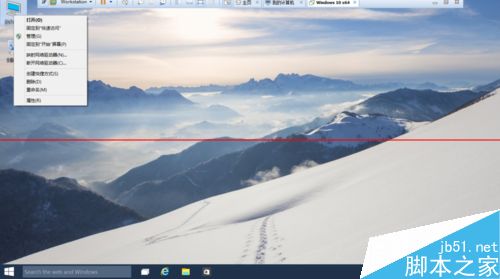
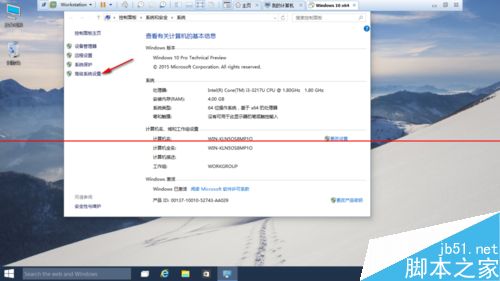
  1. 右鍵「這台電腦」→「內容」→「進階系統設定」。
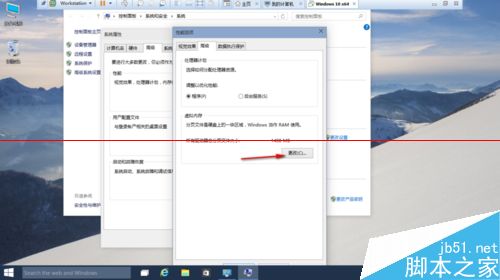
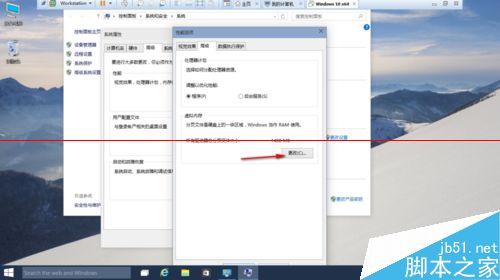
  2. 「進階」索引標籤 → 「效能」區塊「設定」→ 再次點「進階」→ 「虛擬記憶體」區塊「變更」。
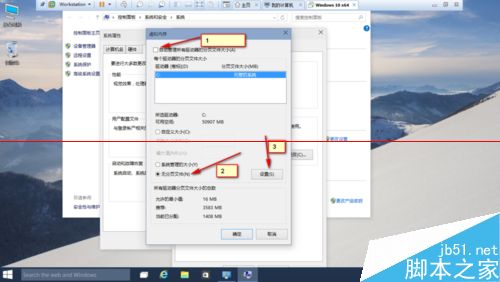
  3. 取消勾選「自動管理所有磁碟機的分頁檔大小」,選擇系統盤 → 「無分頁檔」→ 「設定」→ 「確定」。
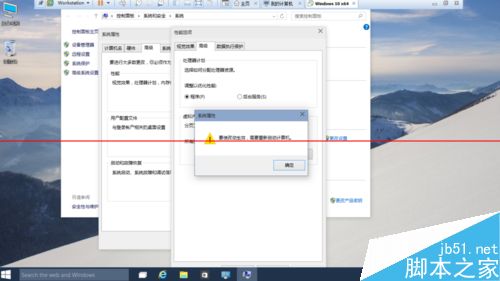
  4. 重新開機生效。

⚠ 記憶體不足(如 8GB 以下)機種不建議關閉,恐導致系統不穩或程式當機。

延伸閱讀

  • Win10 如何設定開始選單全螢幕?
  • Win10 問題回報設定是灰色怎麼辦?
  • Win10 輸入法已停用 IME 無法輸入中文怎麼辦?
Copyright © Windows教程網 All Rights Reserved