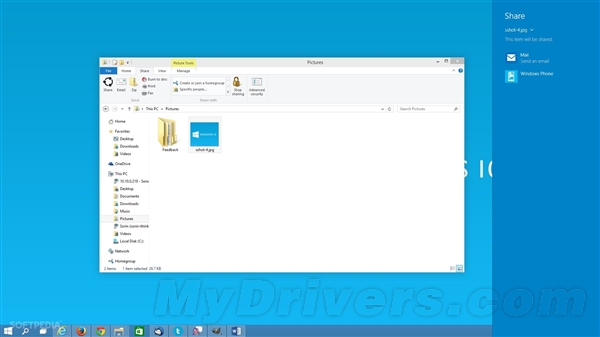
Win10 檔案總管工具列新增「分享」按鈕,選取檔案點擊即開啟右側分享 Charm,列出支援分享契約的應用(郵件、Facebook、Twitter 等),方便傳統鍵鼠用戶快速分享。
微軟表示功能仍在早期階段,未來幾月將持續完善 Charm 介面與分享體驗。此設計主要照顧非觸控裝置用戶,省去呼叫 Charms 列的步驟。
Win10 檔案歷程記錄備份排除特定資料夾設定教學
Win10 Build 9879 官方中文 ISO 鏡像下載與安裝教學 (虛擬光碟/隨身碟/硬碟安裝)
什麼時候能買到預裝 Windows 10 的 PC?
Win10 Mobile 10586.71 如何更新?需先安裝設定更新,採全新累積更新機制大幅提速
Win7 IE 瀏覽器突然無法開啟網頁?重設 IE 設定至預設值快速修復
Win7 刪除不明帳戶權限,強化系統安全
Win10 Build 10134 新增「停止接收 Insider 建置」功能:一鍵退出預覽版推送、可選擇是否參與新功能測試
你準備好免費升級 Windows 10 了嗎?13 問答完整檢視