Windows XP Windows 7 Windows 2003 Windows Vista Windows 綜合教學 Linux 系統教學
Windows 10 Windows 8 Windows 2008 Windows NT Windows Server 電腦軟體教學
您现在的位置: Windows教程網 >> Windows教程 >  >> Windows 綜合教學 >> 關於 Windows

Windows 10 桌面圖示位置與排列無法儲存?修改 InProcServer32 登錄值指向 windows.storage.dll 即時修復

編輯:關於 Windows

Windows 10 取消「自動排列圖示」後,圖示應可自由拖曳排列並保持位置。但部分使用者遭遇重整後圖示自動回位、無法儲存自訂排列。經確認為 InProcServer32 登錄值指向錯誤導致,修正指向 windows.storage.dll 即可解決。

修復步驟

  1. Win+R → regedit 開啟登錄表編輯器。
  2. 取得下列路徑的管理員權限(右鍵 → 權限 → 將 Administrators/目前使用者設為完全控制):
    32 位元系統: HKEY_CLASSES_ROOT\CLSID\{42aedc87-2188-41fd-b9a3-0c966feabec1}\InProcServer32
    64 位元系統: HKEY_CLASSES_ROOT\Wow6432Node\CLSID\{42aedc87-2188-41fd-b9a3-0c966feabec1}\InProcServer32
  3. 雙擊「(預設)」值,將數值資料修改為:
    %SystemRoot%\system32\windows.storage.dll
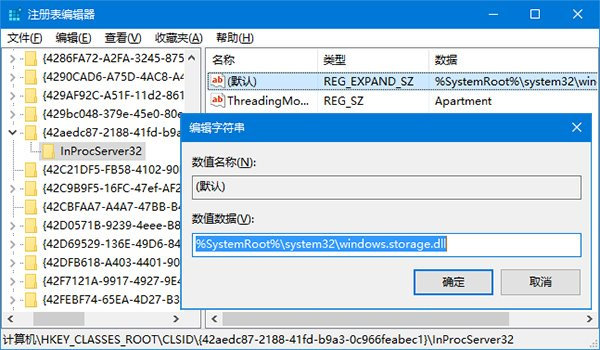
  4. 重新啟動電腦生效。
修改 InProcServer32
將 (預設) 值修改為 %SystemRoot%\system32\windows.storage.dll

原理說明

{42aedc87-2188-41fd-b9a3-0c966feabec1} 為「資料夾檢視」相關 COM 物件。其 InProcServer32 指向錯誤 DLL 會導致殼層擴充功能異常,進而影響桌面圖示排列狀態的持久化儲存。指向正確的 windows.storage.dll 可恢復正常行為。

適用範圍

  • Windows 10 所有版本(家庭版、專業版、企業版、教育版)。
  • 32/64 位元系統路徑不同,請依實際架構操作。
Copyright © Windows教程網 All Rights Reserved