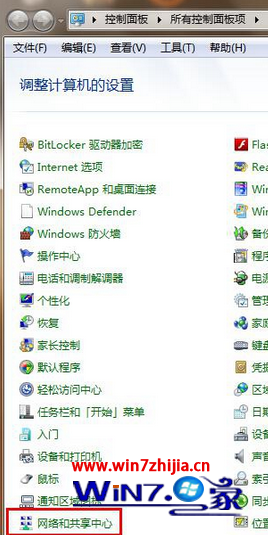
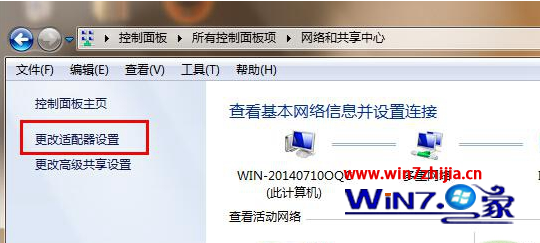
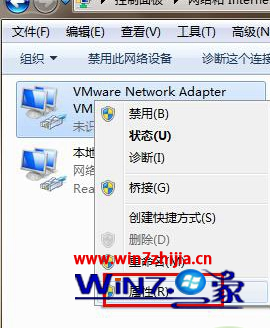
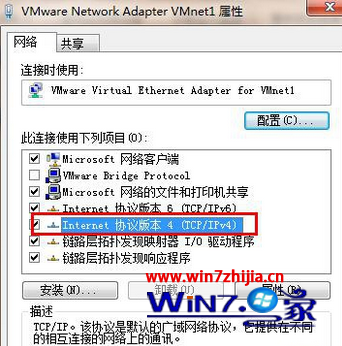
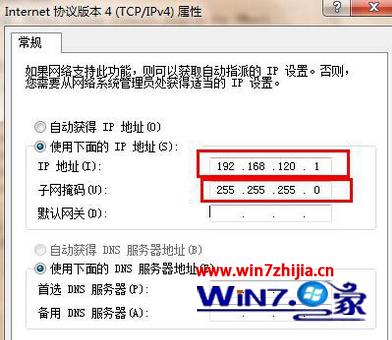
清理檔案後無法上網,多為 TCP/IP 協定損毀,重新安裝即可恢復。
此法可重置 TCP/IP 協定狀態,解決網路連線異常。
Win7 玩《俠客風雲傳前傳》黑屏?更新顯卡驅動、裝遊戲運行庫、雙顯卡切獨顯三步排除
Win7 資料夾加密三大法:隱藏屬性、壓縮設定密碼、專用加密軟體 (含急救中心解密)
Win8.1 WiFi 頻繁斷線、連不上?啟用 FIPS 相容性徹底解決
Windows 7 顯示副檔名與啟用檔案內容搜尋完整設定教學
Win7 開啟資源回收筒提示「此項目屬性未知」?群組原則恢復預設修復
Windows 7 防火牆開啟連接埠圖文教學:建立輸入規則允許特定 Port
Windows 10 Mobile/PC 磚塊排列組合玩法:情侶專屬愛心圖案、應用程式清單字母全點亮、工作列自訂文字
Windows 10 預覽版 9879 更新步驟完整教學