Win10 內建 shutdown 指令,寫成 .bat 批次檔即可定時關機:
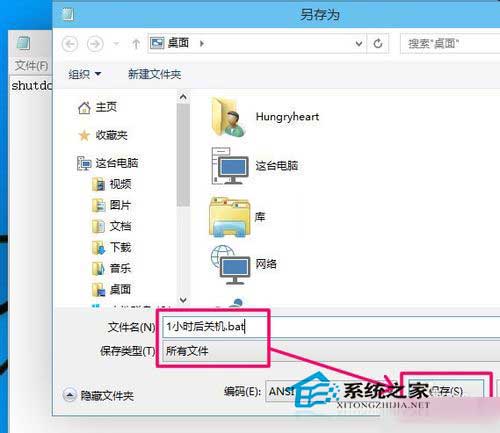
shutdown -s -t 3600 (3600 秒 = 1 小時)。shutdown_1hr.bat (須 .bat 副檔名)。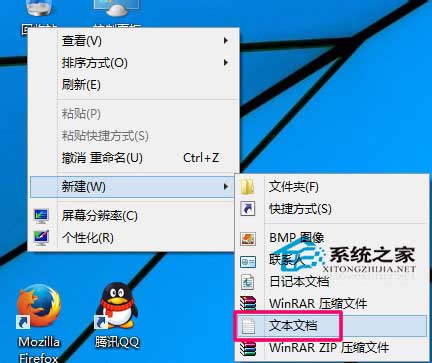

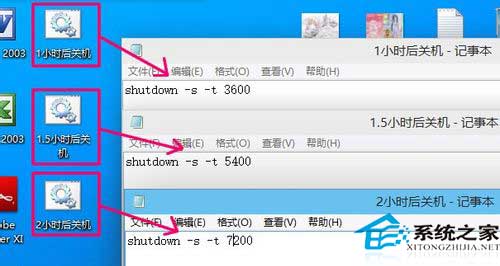
Win+R → shutdown -a → 確定。
Win8 同理可用,參考《Win8 系統下如何設定一鍵關機》。
WinXP 開機進入選單後自動重啟無限循環?關閉「系統失敗自動重啟」一鍵解決
Win10 Mobile 10572 新功能:未接來電顯示響鈴次數,識別詐騙電話好幫手
Windows 10 隱藏神器 Game Bar 螢幕錄影教學:Win+G 開啟、Win+Alt+R 錄製、Xbox 應用管理剪輯
Win10 Spartan (Edge) 瀏覽器啟用與上手體驗:about:flags 開啟實驗性 EdgeHTML 引擎、功能詳解
Win8 照片應用不顯示新照片?必須先開啟應用再匯入圖片才會同步顯示
Win10 原生支援 USB 3.1 Type-C 雙面插與 Dual Role 雙向傳輸,硬體廠商跟進可望普及