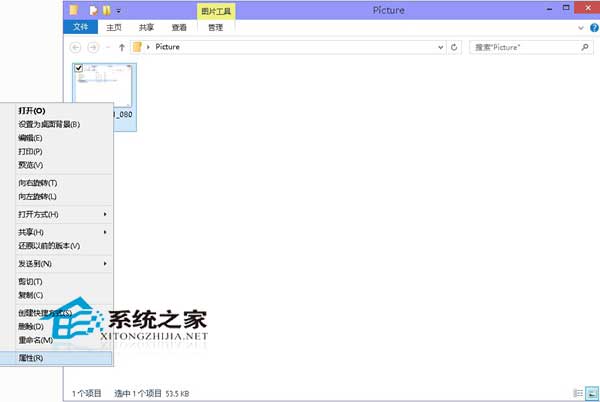
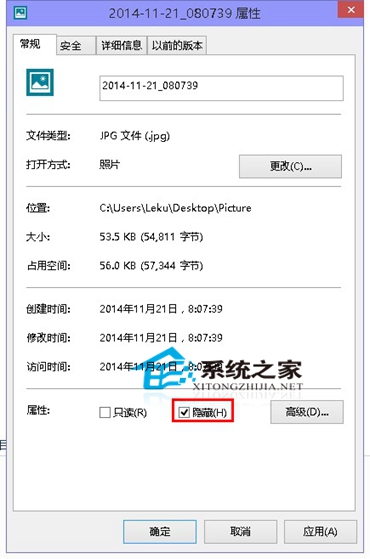
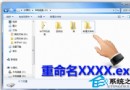
想把私密檔案從檔案總管隱藏?Windows 10 內建隱藏屬性功能,操作簡單:
設定完成後,該檔案將不再顯示於一般檢視中。若需查看隱藏檔案,請參考《Windows10 系統下如何查看隱藏檔案》教學。
Win10 更新 KB3122947 報錯 0x80070643?DISM 指令自動安裝離線套件解決
Windows 8 建立 VPN 虛擬網路連線教學:適用企業遠端辦公
微軟再推 KB2952664 更新 Win7 助升級 Win10 不想升級請隱藏或移除
Windows 10 如何跳過開機歡迎畫面?本機群組原則設定教學
[影片] Win10 手機 10549 體驗:Bug 影響日常使用,不建議主力機更新
Windows 7 開啟「上帝模式」:一個資料夾掌握所有控制台設定
Win8 系統垃圾清理四大法:內建工具、360/金山衛士、Win8 優化大師、自製一鍵清理批次檔
Win10 系統需求與升級條件完整指南:硬體規格、授權規則、優缺點、回滾與常見問題