Windows XP Windows 7 Windows 2003 Windows Vista Windows 綜合教學 Linux 系統教學
Windows 10 Windows 8 Windows 2008 Windows NT Windows Server 電腦軟體教學
您现在的位置: Windows教程網 >> Windows教程 >  >> Windows 綜合教學 >> 關於 Windows

Windows 8 建立 VPN 虛擬網路連線教學:適用企業遠端辦公

編輯:關於 Windows

Windows 8 內建 VPN 用戶端,支援建立虛擬私人網路連線,主要適用於企業遠端存取內部資源。一般家庭用戶較少使用。

建立步驟概述

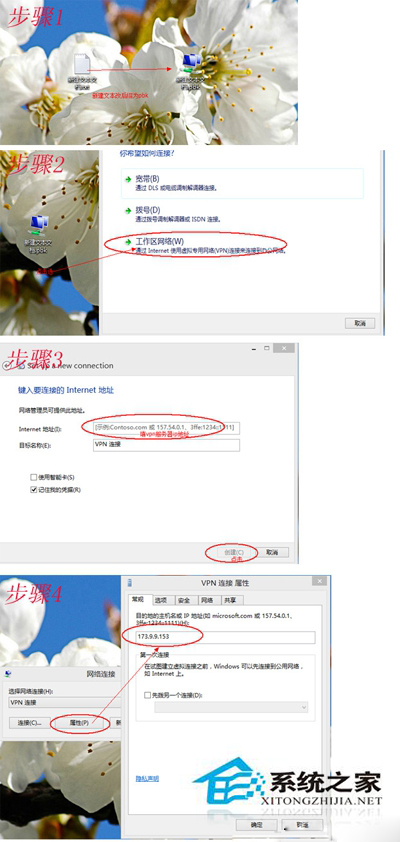
  1. 開啟「網路和共用中心」→ 「設定新的連線或網路」。
  2. 選擇「連線到工作場所」→ 「使用我的網際網路連線 (VPN)」。
  3. 輸入公司 VPN 伺服器網址/IP、連線名稱。
  4. 輸入帳號密碼 (公司 IT 提供) → 建立完成。
  5. 網路圖示右鍵 → 選擇該 VPN 連線 → 連線。
VPN 連線建立精靈步驟 1 VPN 連線建立精靈步驟 2

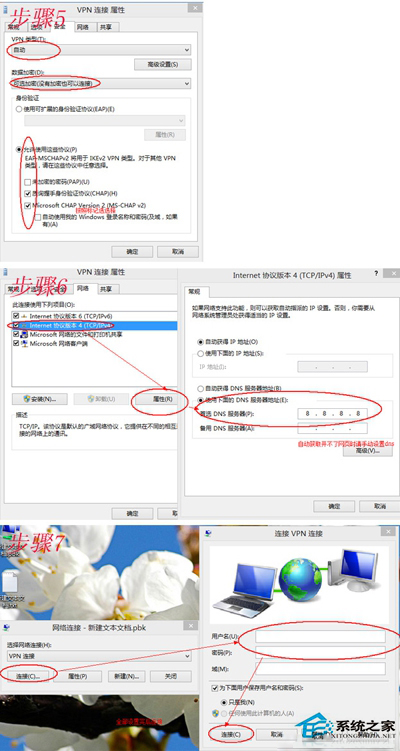
詳細參數 (通訊協定、加密、分割通道等) 需諮詢公司 IT 管理員。家庭用戶若無企業 VPN 伺服器則無法使用此功能。

Copyright © Windows教程網 All Rights Reserved