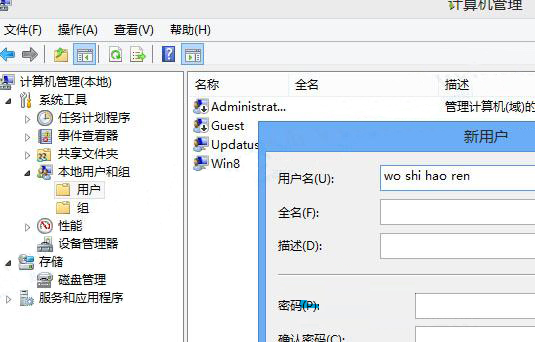
Win8內建Modern遊戲(如水果忍者)無法存檔,主因遊戲無法識別中文使用者名稱。解決法:
附帶提醒:Modern遊戲若遇閃退、黑畫面,通常更新顯卡驅動即可解決。
Win7 資料夾捲軸跑到右側怎麼辦?改用「清單」檢視模式即可歸位底部
XP 可升級 Win10 僅需 $39.99?僅限 32 位家庭版、數位下載、無實體媒體
Windows 8 雙顯示卡開機黑屏?停用核心顯示卡解決
Win7 畫面顯示優化設定:高對比度、放大鏡、文字縮放、動畫關閉全攻略
微軟補丁日 13 項安全更新總量高達 1.2GB,實際僅需安裝 3 個高危補丁
Win7 開始功能表圖示無法拖曳到桌面?兩種解決方法
Win7 開啟/關閉無線路由器 SSID 廣播:防蹭網與手動連線完整教學
Win10 桌面版 Cortana 小娜發送簡訊功能演示影片