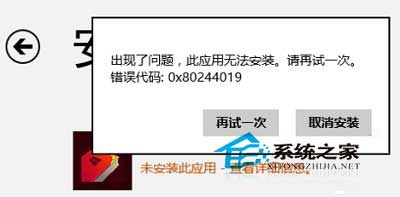
從 Windows 應用商店下載應用時跳出錯誤代碼 0x80244019,提示「出現了問題,此應用無法安裝。請再試一次。」這通常是網路連線問題,或是系統未激活、未使用微軟帳號登入導致微軟伺服器拒絕服務。
實測經驗:Windows 應用商店時好時壞,若上述方法無效,可參考類似錯誤 0x80073cf0 的解法(《Win8.1 商店程式無法安裝提示 0x80073cf0 錯誤的解決方法》)。
0x80073cf0
WinXP 隱藏控制台防他人亂改:群組原則一鍵禁用
Win8/Win8.1 開啟攝影機 (相機) 兩大方法:內建 App 與第三方軟體 ECAP
修改 Windows 7 桌面資料夾實體路徑:遷移至非系統磁碟保護資料
Win10 Build 9926 移除開始選單磁貼應用後的空白區域現象
Win10 正式版字體顯示方塊亂碼?安裝補充字體輕鬆解決
Win10 Build 10576 執行流暢度實測:Edge 串流投影、PDF 整合小娜、Xbox Beta 更新
Win10 系統總重置默認應用該怎麼解決?
Win10 IE 瀏覽器封鎖彈出視窗:網際網路選項啟用攔截器