Windows XP Windows 7 Windows 2003 Windows Vista Windows 綜合教學 Linux 系統教學
Windows 10 Windows 8 Windows 2008 Windows NT Windows Server 電腦軟體教學
您现在的位置: Windows教程網 >> Windows教程 >  >> Windows 綜合教學 >> 關於 Windows

修改 Windows 7 桌面資料夾實體路徑:遷移至非系統磁碟保護資料

編輯:關於 Windows

桌面檔案預設存放在系統磁碟(C:),不僅佔用系統空間導致開機變慢、系統卡頓,重灌系統時還需額外備份。本文教您透過登錄編輯器修改 HKEY_CURRENT_USER\Software\Microsoft\Windows\CurrentVersion\Explorer\User Shell Folders 中的 Desktop 字串值,將桌面路徑指向其他磁碟(如 D:\Desktop),重開機後生效,徹底解決桌面檔案佔用 C 槽與重灌備份煩惱。

操作步驟

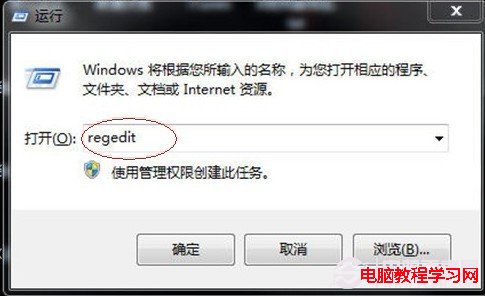
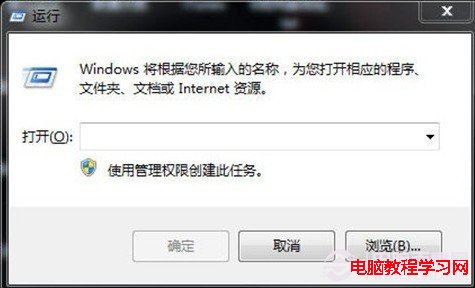
  1. Win+R 輸入 regedit 開啟登錄編輯器。
  2. 執行 regedit
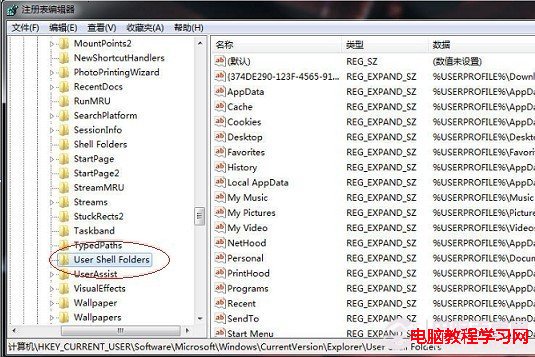
  3. 依序展開:HKEY_CURRENT_USER → Software → Microsoft → Windows → CurrentVersion → Explorer → User Shell Folders。
  4. 登錄路徑展開
  5. User Shell Folders 機碼
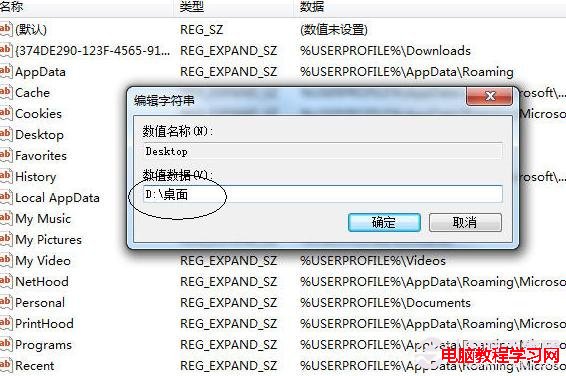
  6. 右側找到 Desktop 字串值 → 雙擊修改「數值資料」為預先建立的資料夾路徑(如 D:\Desktop)。
  7. 修改 Desktop 數值
  8. 輸入新路徑
  9. 確認修改
  10. 修改完成
  11. 重開機生效
  12. 重新開機,桌面檔案即儲存於新位置。

注意事項

  • 修改前請先在目標磁碟建立好資料夾(如 D:\Desktop)。
  • 建議同步修改 HKEY_CURRENT_USER\Software\Microsoft\Windows\CurrentVersion\Explorer\Shell Folders 下的 Desktop 值,確保相容性。

  • 原桌面現有檔案需手動移動至新資料夾。
Copyright © Windows教程網 All Rights Reserved