Win8/8.1安裝.NET 3.5失敗,標準解法為DISM離線安裝。複製安裝媒體sources\sxs至本地,管理員命令提示字元執行dism /online /enable-feature /featurename:NetFX3 /Source:路徑 /LimitAccess,一鍵完成。
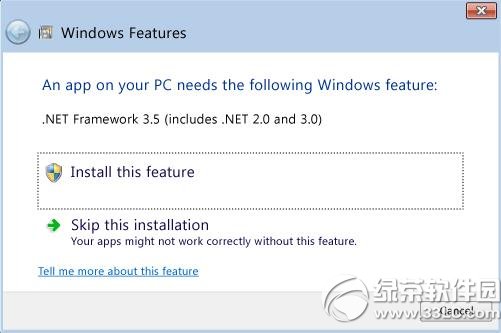
sources\sxs 至 D:\sources\sxs(或任意非系統盤)。dism.exe /online /enable-feature /featurename:NetFX3 /Source:D:\sources\sxs /LimitAccess
/LimitAccess:禁止連線Windows Update,強制使用本地來源(離線環境必加)。/Source:指向含microsof-windows-netfx3-ondemand-package~等cab檔的目錄。0x800F081F:來源路徑錯誤/媒體版本不符。0x800F0906:缺/LimitAccess嘗試聯網失敗。0x800F0922:元件存儲損壞 → dism /online /cleanup-image /restorehealth修復後重試。同ID 75962內容,此處為精簡版供快速參考。
SkyDriveSetup.exe 非有效 Win32 應用程式:XP/Server 2003 不支援,或安裝檔損壞
Win7 筆電變身無線 AP:用指令建立託管網路分享有線網路給手機
任務欄輸入法圖標消失?檢查系統圖標設置、修復 ctfmon.exe 或用搜狗輸入法自帶修復工具
XP系統訪問 GPT 硬盤方案:移植 Win2003 SP2 disk.sys 驅動破解 2TB+ 容量限制
使用 USB 隨身碟啟動 Win8 PE 並安裝 Win7 系統完整圖文教學
Windows 7 切換輸入法/大小寫鎖定發出提示音設定教學