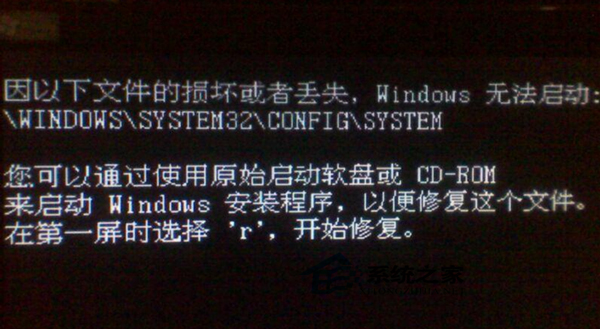
Win7開機黑屏顯示:Windows無法啟動:\Windows\System32\Config\System,核心原因是系統登錄檔損壞/遺失。登錄檔(System、Software、SAM、Security、Default)位於C:\Windows\System32\Config\,若檔案系統錯誤、強制關機、病毒破壞導致損壞,核心無法載入配置而停在啟動階段。使用Win7安裝媒體進入「故障修復控制台」以備份還原登錄檔修復。
dir確認含Windows資料夾的磁碟機代號。REM 1. 建立暫存備份目錄 md C:\tmp REM 2. 備份損壞的登錄檔(若檔案損壞無法複製會報錯,可略過該檔) copy C:\Windows\System32\Config\System C:\tmp\System.bak copy C:\Windows\System32\Config\Software C:\tmp\Software.bak copy C:\Windows\System32\Config\SAM C:\tmp\SAM.bak copy C:\Windows\System32\Config\Security C:\tmp\Security.bak copy C:\Windows\System32\Config\Default C:\tmp\Default.bak REM 3. 刪除損壞的登錄檔 del C:\Windows\System32\Config\System del C:\Windows\System32\Config\Software del C:\Windows\System32\Config\SAM del C:\Windows\System32\Config\Security del C:\Windows\System32\Config\Default REM 4. 從修復備份還原(Windows安裝時自動在C:\Windows\Repair保存一份初始乾淨登錄檔) copy C:\Windows\Repair\System C:\Windows\System32\Config\System copy C:\Windows\Repair\Software C:\Windows\System32\Config\Software copy C:\Windows\Repair\SAM C:\Windows\System32\Config\SAM copy C:\Windows\Repair\Security C:\Windows\System32\Config\Security copy C:\Windows\Repair\Default C:\Windows\System32\Config\Default REM 5. 退出重啟 exit
SystemPropertiesProtection → 建立。reg load HKLM\OfflineSys C:\Windows\System32\Config\System)修復特定鍵值,需專業知識。登錄檔損壞屬嚴重邏輯錯誤,上述「Repair備份還原法」為標準教科書級修復流程,成功率極高。操作前務必確認磁碟機代號,切勿操作錯誤分區。
Win10 預覽版 10565 官方 ISO 鏡像下載彙總 (32/64 位)
Windows 7 遠端桌面「終端伺服器超過最大連線數」三大解決方案:Console 模式、刪除 Session、Admin 參數
Win7 64位 睡眠喚醒後顯示器黑屏?禁用網卡「允許喚醒」屬性解決
Win10 高解析度螢幕字體模糊怎麼辦?註冊表調整 DPI 縮放徹底解決
Win10 Build 10061 出現在 Windows Update 但僅限微軟員工安裝,普通用戶被攔截
Win10 新特性:手势交互 (NUI) 与姿态检测技术,疑为 Lumia 1020 继任者 McLaren 3D 悬浮触控铺垫