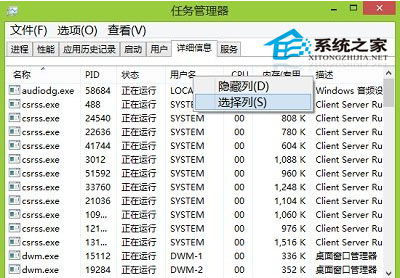
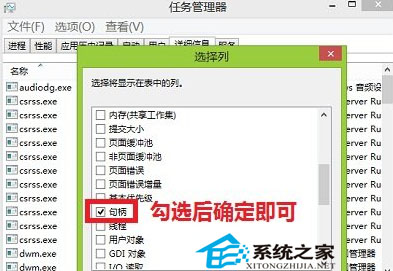
Win8 任務管理器「詳細資料」分頁支援自訂顯示欄位。操作:
同樣方法可取消勾選隱藏不需欄位。善用此功能可深度監控進程資源佔用,強化疑難排解能力。
Win 10 升級專用 USB 揭秘:16GB 僅餘 1GB 可用空間,內含四版本映像
安裝 Win7 旗艦版 C 槽分多大合適?32/64 位元、原版/Ghost 版完整建議
Win10 企業版全球安裝量破 150 萬,企業市場穩步滲透
Win8 系統卡死無回應?Ctrl+Alt+Del + 電源鍵啟動「緊急重新開機」避免強制斷電
Windows 10 透過登錄檔停用 USB 隨身碟等大容量儲存裝置
一行指令刪除 hiberfil.sys,釋放 C 槽數 GB 空間
Win8.1 啟動安全中心服務報錯 1068?啟用相依服務 RPC 與 WMI 解決
Windows 7 家用版顯示桌面圖示與升級旗艦版技巧