安裝 Windows 8.1 跳出 0xC1 錯誤代碼?autorun.dll 損壞或遺失的解決之道
編輯:關於 Windows
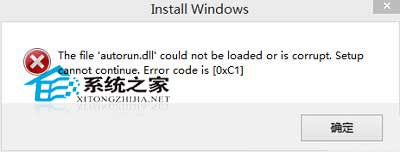
安裝 Windows 8.1 時,畫面跳出錯誤訊息: The file 'autorun.dll' could not be loaded or is corrupt. Setup cannot continue. Error code [0xC1]
中文意為:「autorun.dll 無法載入或已損壞,安裝程式無法繼續。」此錯誤頻繁發生,主因為安裝映像檔不完整或檔案遺失。
解決步驟
使用 MD5 驗證工具檢查下載的 ISO 映像檔雜湊值,若不符官方公布值,請重新下載。
若 MD5 正確,問題可能出在燒錄過程:請重新燒錄光碟、重新製作 USB 安裝碟,或改用硬碟安裝法(參考〈行動硬碟安裝 Windows 8 系統詳細圖文教學〉)。