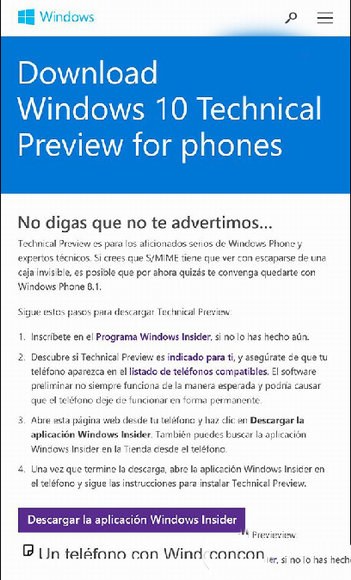
微軟測試 Win10 Mobile 預覽版下載頁面 (墨西哥率先上線)。安裝流程:① 註冊 Windows Insider 會員;② 確認裝置在相容清單;③ 手機瀏覽官網點「下載 Windows Insider App」或商店搜尋;④ 開啟 App 登入 → 下載安裝 Windows 10 Technical Preview for Phones。頁面提醒:預覽版可能不正常運作、導致手機停止工作,部分需特殊硬體/軟體支援。中美區頁面暫未開放。
官方推送前切勿嘗試第三方刷機,保護裝置安全。
Win7 執行 slmgr.vbs 查看啟用資訊彈出記事本?.vbs 檔案關聯被修改的修復方法
Windows 10 如何跳過開機歡迎畫面?本機群組原則設定教學
Win10 無線網路頻繁斷線?關閉網卡「允許電腦關閉此裝置以節省電源」徹底解決
Win7 如何升級 Flash Player?控制台 Flash Player 設定管理器啟用自動更新
Win8/8.1 如何設定開機直接進入桌面而非 Metro 開始畫面?任務列導航頁籤勾選「登入時轉到桌面」
Windows 7 程式「未回應」頻繁假死?修改登錄表 WaitToKillAppTimeout 縮短回應等待時間