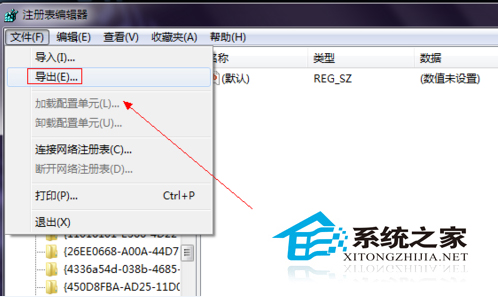
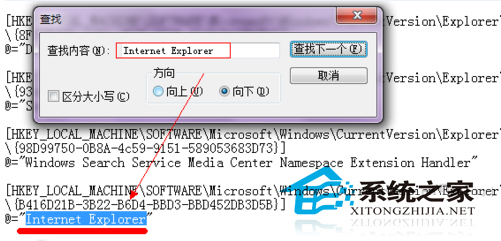
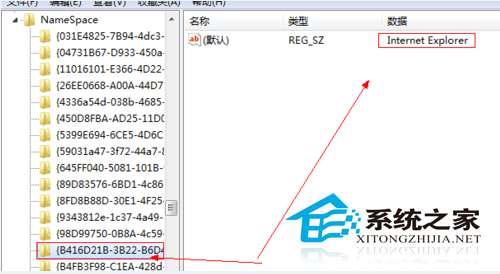
Win7 移除 IE 功能後桌面殘留 IE 圖示無法刪除。原因:HKEY_LOCAL_MACHINE\SOFTWARE\Microsoft\Windows\CurrentVersion\Explorer\Desktop\NameSpace 下仍保留 IE 的 CLSID 機碼 (如 {B416D21B-3B22-B6D4-BBD3-BBD452DB3D5B})。解法:匯出備份該機碼 → 記事本搜尋 "Internet Explorer" 確認 CLSID → 刪除對應機碼 → 重整桌面圖示消失。附六步驟圖文與備份建議。
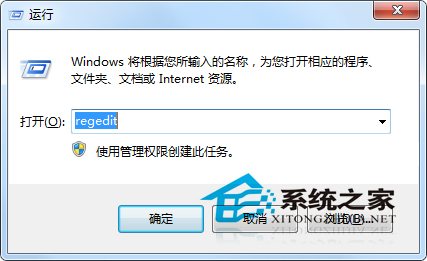
regedit。HKEY_LOCAL_MACHINE\SOFTWARE\Microsoft\Windows\CurrentVersion\Explorer\Desktop\NameSpace。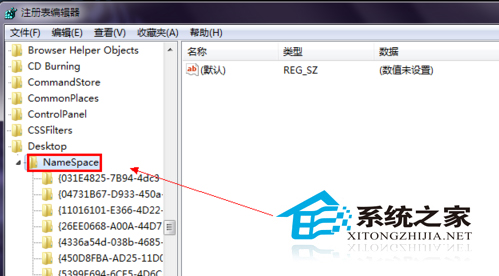
Win7 安裝程式報錯 0x80070422?啟動 Windows Update 服務即可
Win7 休眠喚醒斷網解決:網卡電源管理「允許關閉裝置」導致連線中斷
Win10 安裝金鑰與新功能變化:預覽版金鑰 NKJFK-GPHP7-G8C3J-P6JXR-HQRJR
Win10 Edge/UWP JavaScript 引擎 ChakraCore 開源版支援 Linux 與 macOS:Node 峰會發布跨平台里程碑
Windows 7 安裝 Windows 10 雙系統教學:磁碟管理壓縮分區、掛載 ISO 執行 sources/setup.exe